Nano Banana 2.1: What's New, What It Can Do and How to Prompt It
 by Aristotto16 min
Nano Banana 2.1 is Google's latest high-efficiency image generation and editing model, released in October 2026 as an update to Nano Banana 2.
The update focuses on making Nano Banana more reliable for real creative work. Google has improved visual quality, prompt following, text rendering, multi-turn character consistency, image editing, and complex layouts.
For creators, that makes Nano Banana 2.1 particularly interesting for image generation, conversational editing, posters and graphics with text, consistent characters, campaign variations, and more complex visual briefs.
Nano Banana 2.1 is also available in Aristotto, where you can use it alongside other image and video models as part of a wider creative workflow.
What is Nano Banana 2.1?
Nano Banana 2.1 is an image generation and conversational editing model in Google's Gemini family.
You can use it to create an image from a text prompt, edit an existing image, work with reference images, preserve people or products across generations, add text to designs, and refine an image through multiple rounds of instructions.
It is the direct update to Nano Banana 2.
Nano Banana Pro remains a separate model. Nano Banana 2.1 is positioned as the faster, more efficient general-purpose option, while Nano Banana Pro is intended for more demanding professional image tasks.
For most creators, the important question is not which model has the newest name. It is which model fits the kind of image you are trying to create.
| Criteria | Nano Banana 2.1 |
|---|---|
| Best for | Fast image generation, editing, visual design and campaign iterations |
| Strong points | Prompt following, text, subject consistency, editing and structured compositions |
| Image editing | Conversational and reference-based |
| Reference images | Up to 14 at the model level |
| Output resolution | 1K, 2K and 4K |
| Text in images | Improved rendering and layout accuracy |
| Thinking | Minimal, medium and high |
| Search grounding | Google Web and Image Search supported at the model level |
| Wide formats | Supports extreme horizontal and vertical aspect ratios |
| Good fit for | Posters, ads, editorial visuals, character series and iterative creative work |
The exact controls available to you can depend on the platform where you use Nano Banana 2.1.
What's new in Nano Banana 2.1?
Nano Banana 2 already offered image generation, editing, references, text rendering, and high-resolution output.
Nano Banana 2.1 is mainly about making those capabilities work better and more consistently.
Better prompt following
Complex image prompts often contain several instructions at the same time.
You may specify the subject, camera angle, environment, lighting, text, placement, colors, visual style, and details that must remain unchanged.
The more instructions a prompt contains, the easier it is for an image model to ignore one of them.
Nano Banana 2.1 is designed to follow these more detailed briefs more accurately.
That makes it particularly interesting when you want more control than a simple prompt such as "create a cinematic image."
Improved visual quality
Nano Banana 2.1 also improves visual quality and realism.
This matters when you want a generated image to feel more photographic and less obviously synthetic.
Skin, materials, lighting, depth, reflections, and environmental details are all areas worth paying attention to when comparing the new version with Nano Banana 2.
Better text inside images
Text generation is one of the most practical improvements to test.
Nano Banana 2.1 improves text rendering and layout accuracy, which makes it useful for posters, advertisements, menus, social graphics, covers, presentation visuals, and other designs where words are part of the image.
You should still check every important word before publishing.
Better text generation does not mean spelling, spacing, hierarchy, and layout will be perfect in every result.
Stronger character and subject consistency
Nano Banana 2.1 also improves consistency across multiple generations and editing turns.
That matters when you need the same person, character, product, or object to continue appearing across several images.
For example, you might create:
Multiple campaign images with the same person
A sequence of storyboard frames
Different scenes featuring the same character
Several product campaign variations
A series of edits where the main subject must stay consistent
For actual creative production, this can be more important than creating one impressive standalone image.
Improved image editing
Editing remains one of the strongest reasons to use Nano Banana.
Instead of regenerating an entire image, you can upload an existing visual and describe what should change.
For example:
Replace the daytime restaurant with an empty train carriage at night. Keep the woman, her face, hairstyle, sweater, pose, coffee cup, camera angle and framing unchanged.
The important part of this kind of prompt is not only describing the new result.
You are also telling the model what it should not change.
Nano Banana 2.1 improves this type of targeted editing and multi-turn consistency, although you should still inspect small objects and details after every edit.
Better handling of complex layouts
Nano Banana 2.1 also improves structured visual design.
This is useful when an image needs several elements arranged intentionally rather than simply placed somewhere in the frame.
That can include posters, editorial graphics, menus, advertisements, infographics, presentation visuals, and other designs with clear visual hierarchy.
Better wide and panoramic generation
The new version also improves very wide and panoramic image generation.
This can be useful for website headers, campaign banners, cinematic scenes, wide advertising formats, and other layouts that do not use a standard square or portrait canvas.
What is Nano Banana 2.1 best at?
There is no reason to call every new AI image model the best image generator.
Nano Banana 2.1 makes the most sense when its particular strengths match your task.
Posters and visual design
The combination of typography, layout, prompt following, and image generation makes Nano Banana 2.1 interesting for designs where several elements need to work together.
This includes posters, event graphics, campaign concepts, social ads, magazine-style visuals, and covers.
Image editing
If you already have an image that is close to what you need, editing can be faster than starting again.
You can change environments, clothing, objects, lighting, composition, or visual style while asking the model to preserve specific elements.
Consistent characters and people
Consistency matters when you are creating a series rather than one image.
Reference images combined with clear preservation instructions can help keep the same character, person, or visual identity across multiple scenes.
Complex creative briefs
Nano Banana 2.1 is also worth testing when a prompt contains multiple requirements.
Instead of relying only on aesthetic words, you can give the model instructions about composition, positioning, lighting, copy, visual hierarchy, and elements that must or must not appear.
Images with text
The model is useful for creative assets where text is part of the composition rather than something added later.
That could include a poster headline, event information, packaging concept, menu, advertisement, or editorial graphic.
How to prompt Nano Banana 2.1
Longer prompts are not automatically better.
What matters is giving the model useful information in a clear order.
A strong prompt usually answers a few basic questions.
What is the main subject?
Where is it?
How should the image be composed?
What kind of lighting should it use?
What should the visual style feel like?
Is there text that must appear exactly?
Are there any important restrictions?
For image editing, there is another important question:
What must remain unchanged?
Instead of writing:
Put her in a train station.
Try:
Move the woman into an empty European train station early in the morning. Preserve her face, hairstyle, age, expression, body proportions and camera framing. Change the environment and lighting while keeping the person recognizable as the same individual.
The second prompt gives the model much clearer boundaries.
Nano Banana 2.1 prompt examples
The following examples test different capabilities instead of generating several versions of the same type of image.
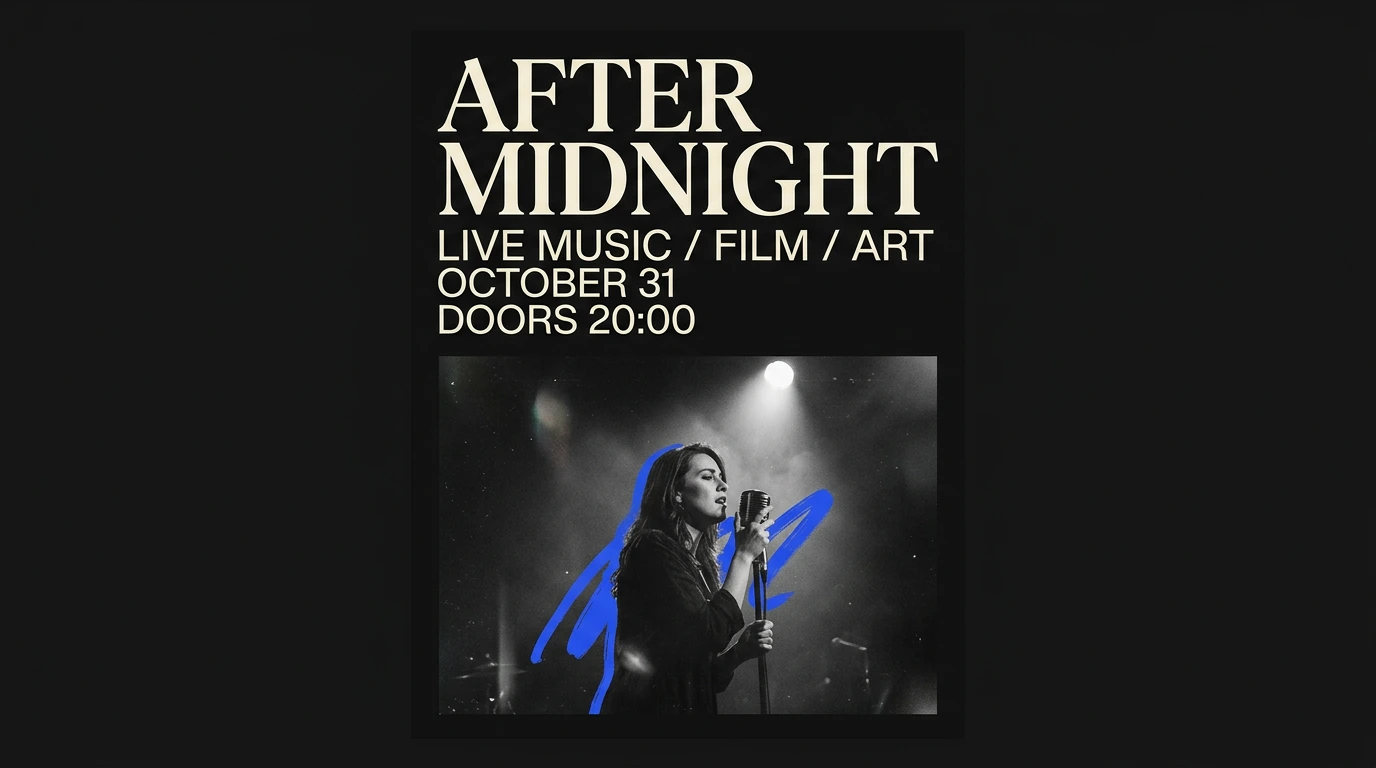
Prompt 1: Typography and visual design
This prompt tests typography, composition, hierarchy, and the model's ability to follow several design instructions at once.
Create a premium editorial poster for an independent nighttime music festival called "AFTER MIDNIGHT".
Use a vertical 4:5 composition with a deep black background, warm ivory typography and one cobalt blue accent.
The exact headline must read:
"AFTER MIDNIGHT"
Under the headline, include the exact text:
"LIVE MUSIC / FILM / ART"
"OCTOBER 31"
"DOORS 20:00"
Place a cinematic photograph of a lone female singer under a single stage spotlight in the lower half of the composition.
Use strong editorial typography, generous negative space and a sophisticated contemporary culture magazine aesthetic.
Keep all requested text clearly readable.
Do not add any other words, logos, dates or slogans.
Avoid neon cyberpunk styling, generic festival graphics and crowded composition.
This is a useful test because a strong result needs more than an attractive image.
The model has to handle exact text, visual hierarchy, photography, spacing, and overall poster design at the same time.
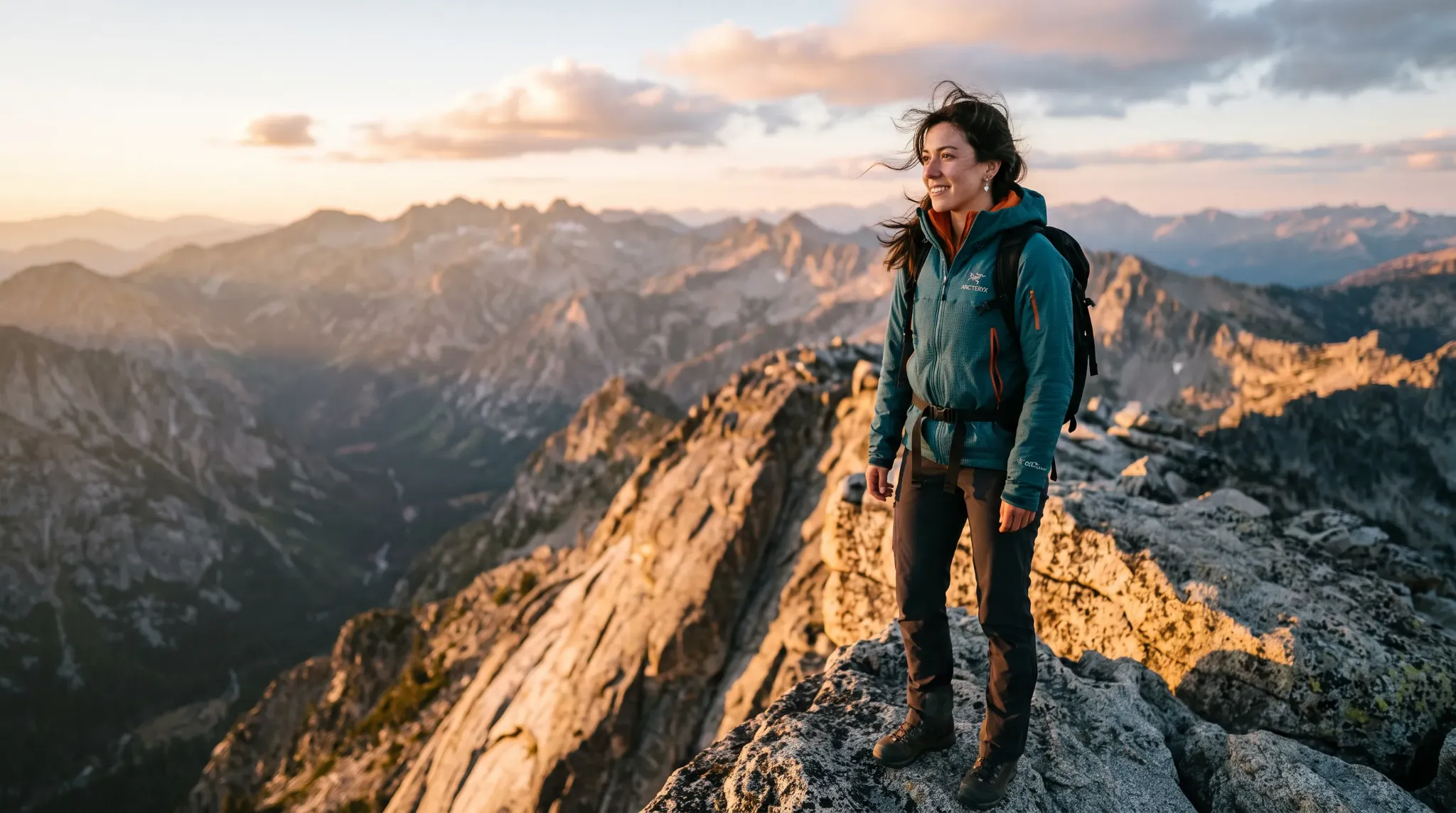
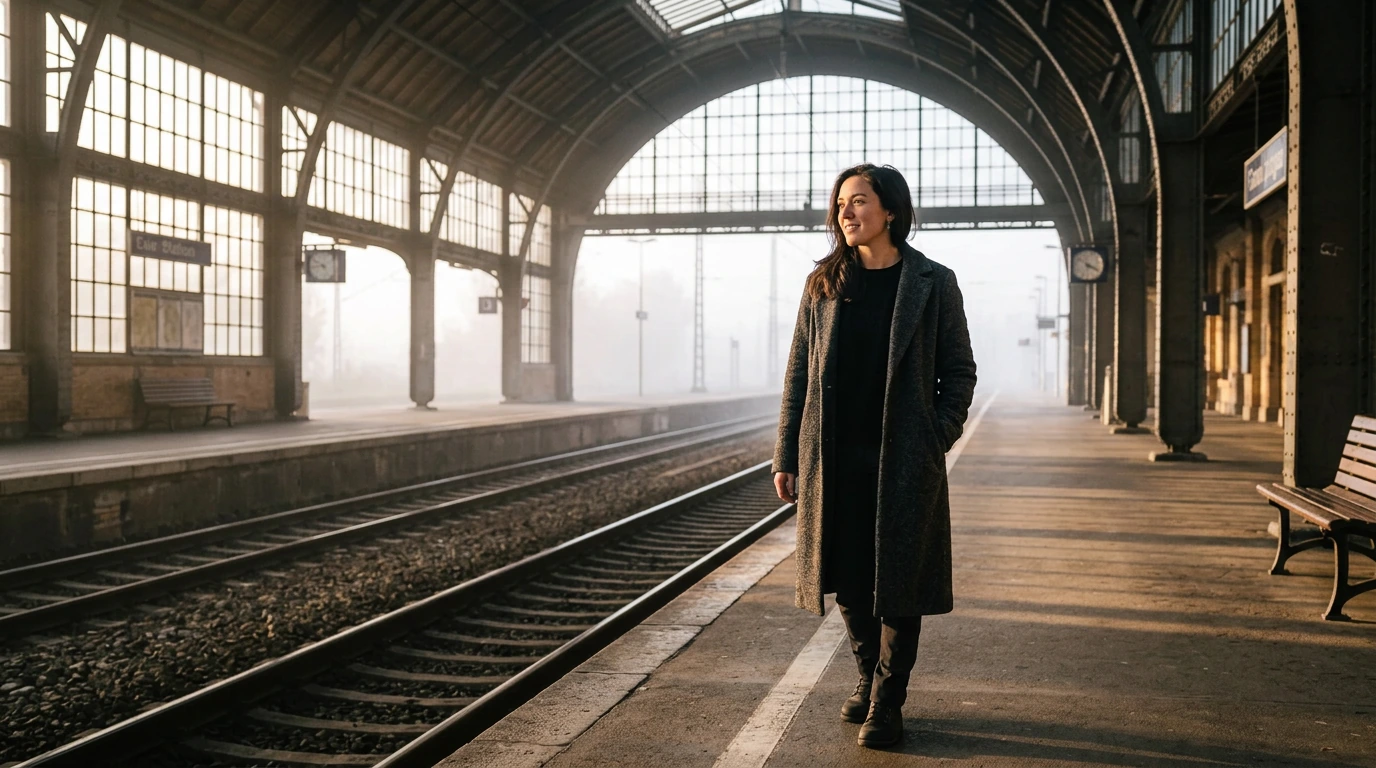
Prompt 2: Reference-based character editing
This prompt tests whether Nano Banana 2.1 can make a significant environmental change while preserving the same person.
Use a portrait or full-body image as the reference.
Move the person from the reference image into a quiet European train station early in the morning.
Preserve the same face, facial proportions, hairstyle, age, expression and overall identity.
Keep the person's body proportions natural.
Change the clothing to a long charcoal wool coat over a simple black outfit.
Show the person standing beside an empty platform with soft morning fog outside and warm light entering through the station windows.
Use a medium full-body composition with a natural 50mm photography feel, realistic skin texture and understated cinematic lighting.
Keep the result believable and photographic.
Do not beautify the face, change the person's age or alter their defining facial features.
When reviewing the result, look beyond whether the image is attractive.
Check whether the face, identity, age, proportions, and defining features are actually preserved.
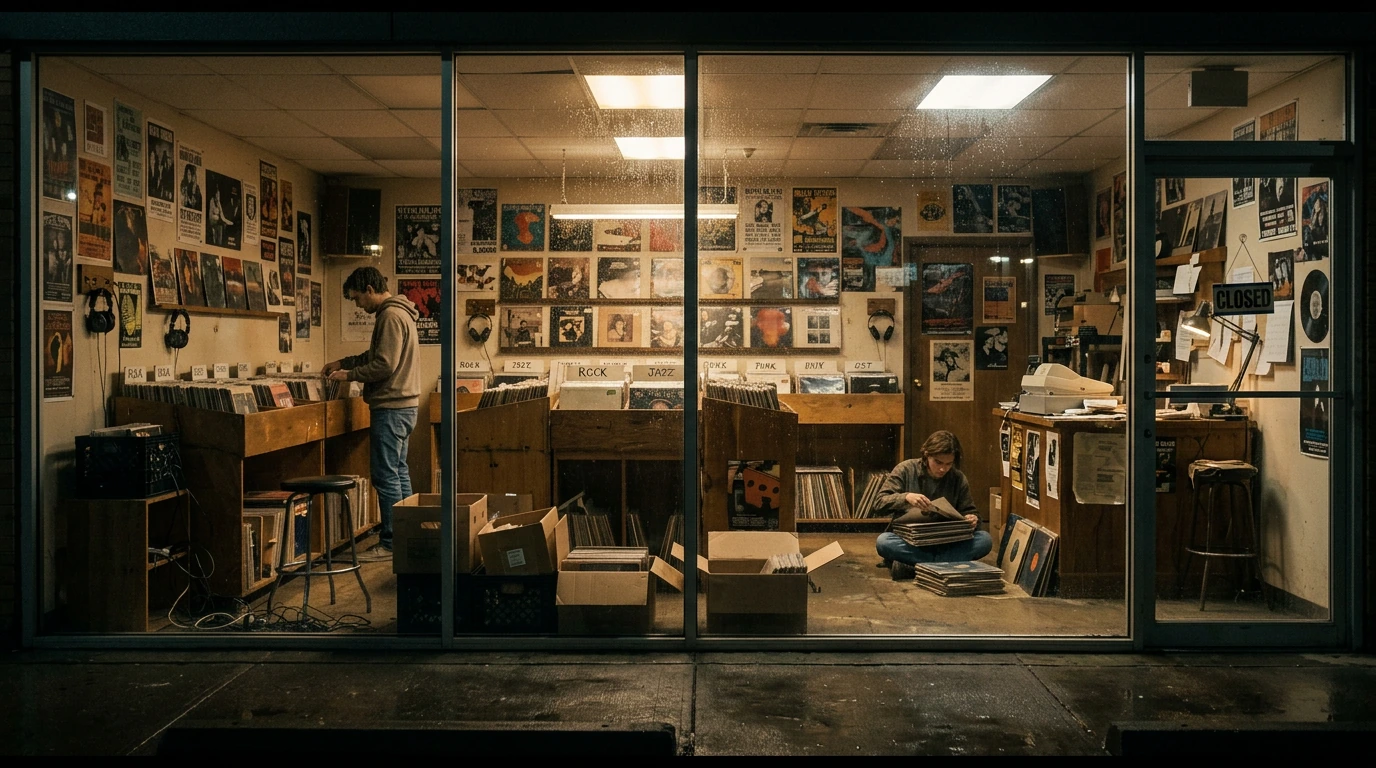
Prompt 3: Complex cinematic environment
This prompt tests realistic scene construction, environmental detail, perspective, and wide composition.
Create a cinematic panoramic photograph of a small independent record store late at night after closing.
View the entire store from outside through a long glass storefront.
Inside, one employee is quietly organizing vinyl records while another person sits on the floor near a stack of album sleeves.
Include believable details such as handwritten genre cards, listening headphones, old wooden record bins, posters with no readable text, cables, stools and partially packed delivery boxes.
Warm tungsten light fills the shop while the street outside is dark and wet from recent rain.
Reflections on the glass should feel physically realistic without hiding the interior.
Use a very wide panoramic composition with natural perspective and strong depth across the entire frame.
The scene should feel observed rather than staged.
Avoid cyberpunk lighting, luxury interior styling, duplicated people and repeated objects.
This example is useful for testing whether the model can manage many environmental details without making the scene feel artificial or repetitive.
How to get better results from Nano Banana 2.1
For complex generations, focus on instructions rather than filling the prompt with adjectives.
If text matters, provide the exact text and tell the model not to add anything else.
If identity matters, list the characteristics that should stay unchanged.
If you are editing an image, clearly separate the change from the preserved elements.
For example:
Change: Replace the restaurant interior with an empty train carriage at night.
Keep unchanged: The woman, face, hairstyle, sweater, pose, coffee cup, camera angle and framing.
This gives the model a clearer definition of the task.
For visual design, describe hierarchy rather than only describing the style.
Instead of:
Make a cool modern poster.
Try:
Place a large headline at the top, the photograph in the lower half, small event information underneath, and leave generous negative space. Do not add any other text.
That gives the model actual layout instructions.
Can Nano Banana 2.1 use multiple reference images?
Yes.
Nano Banana 2.1 supports up to 14 reference images at the model level.
These references can be useful when the final image needs to preserve multiple characters, products, objects, or other visual elements.
However, more references do not automatically produce a better image.
For most creative tasks, start with the smallest number of references needed to communicate the idea.
If one reference already contains the subject you need to preserve, try that first.
Add more references only when they provide information the first image does not contain.
What are Nano Banana 2.1 Thinking levels?
Nano Banana 2.1 supports minimal, medium and high Thinking levels.
These settings control how much reasoning the model uses before producing the final image.
A simple generation may not need the highest setting.
A straightforward portrait or environment can often work well with less reasoning.
More complex layouts, typography, several subjects, detailed edits, or structured visual information may benefit from additional reasoning.
Not every platform exposes the same controls directly, so the settings you see depend on where you use the model.
Can Nano Banana 2.1 use real-world information?
At the model level, Nano Banana 2.1 supports grounding with Google Web Search and Google Image Search.
This allows the model to use current information and visual references for certain tasks instead of relying only on information learned during training.
That can be useful for real places, recognizable subjects, informational graphics, and other tasks where outside context matters.
However, grounding does not guarantee factual accuracy.
If you are creating an infographic, map, diagram, chart, or other factual visual, verify the information before publishing it.
Is Nano Banana 2.1 better than Nano Banana 2?
Nano Banana 2.1 is the newer update and is designed to improve visual quality, prompt following, text rendering, editing, and consistency.
That makes it the logical version to test first for new work.
But "newer" does not mean every individual generation will automatically look better.
The more useful way to compare them is to use the same prompt and judge the outputs against the original brief.
Does 2.1 preserve the subject better?
Does it follow the composition more accurately?
Is the text more reliable?
Does it handle smaller scene details correctly?
We will compare Nano Banana 2 and Nano Banana 2.1 directly in the next article using the same prompts for both models.
Is Nano Banana 2.1 the same as Nano Banana Pro?
No.
Nano Banana 2.1 and Nano Banana Pro are separate models.
Nano Banana 2.1 is the high-efficiency model designed for fast image generation and conversational editing.
Nano Banana Pro is positioned for more demanding professional visual tasks.
The naming can be confusing because Nano Banana 2.1 is newer, but that does not mean it replaces the Pro model.
Choose based on the task rather than the model name alone.
Where can you use Nano Banana 2.1?
Nano Banana 2.1 is available in Aristotto Workspace alongside other image-generation models.
You can use it to create a new image, edit an existing one, compare its output with another model, or create a visual that can later become the starting point for video generation.
That can be useful when you are still deciding which image model responds best to a particular creative brief.
Instead of building your process around one model, you can choose the model that fits the task.
What should you watch out for?
Nano Banana 2.1 is improved, but it is still a generative image model.
Check important text manually.
Inspect faces and smaller subjects carefully.
For edits, make sure requested objects have actually been preserved.
Check spatial instructions when left, right, foreground, and background placement matter.
Do not assume diagrams or factual graphics are correct simply because they look convincing.
When consistency matters, compare the new result with the original reference instead of judging only whether the generated image looks good.
The most attractive result is not always the most accurate one.
For many creative workflows, following the brief is more important than producing the most dramatic image.
Common queations
What is Nano Banana 2.1?
Nano Banana 2.1 is Google's latest high-efficiency image generation and editing model, released in October 2026 as an update to Nano Banana 2.
What is new in Nano Banana 2.1?
The update improves visual quality, prompt following, text rendering, image editing, subject consistency and complex layouts.
Is Nano Banana 2.1 better than Nano Banana 2?
It is designed as the improved successor to Nano Banana 2, but individual results can still vary by prompt, reference image and creative task.
Is Nano Banana 2.1 the same as Nano Banana Pro?
No. Nano Banana 2.1 is the newer high-efficiency model, while Nano Banana Pro remains a separate model for more demanding visual tasks.
Is Nano Banana 2.1 good for image editing?
Yes. Image editing and multi-turn consistency are important strengths, especially when you clearly state what should change and what should remain unchanged.
Can Nano Banana 2.1 generate text in images?
Yes. Text rendering and layout accuracy are improved, but important words, prices and labels should still be checked before publishing.
Can Nano Banana 2.1 use reference images?
Yes. The model supports reference-based generation and editing and can work with multiple references for more complex tasks.
What resolution does Nano Banana 2.1 support?
Nano Banana 2.1 supports 1K, 2K and 4K image output.
What is Nano Banana 2.1 best for?
It is well suited to image generation, editing, posters, campaign visuals, consistent subjects, structured designs and creative iteration.
Can I use Nano Banana 2.1 in Aristotto?
Yes. Nano Banana 2.1 is available in Aristotto Workspace alongside other image-generation models.
How should I prompt Nano Banana 2.1?
Describe the subject, composition, environment, lighting and required details clearly. For edits, also specify what must remain unchanged.
Does Nano Banana 2.1 always follow prompts perfectly?
No. Check text, small details, subject consistency, spatial instructions and factual information before using the final image.