GPT Image 2.5 Flare vs Sunburst: Which Version Should You Use?
 by Aristotto12 min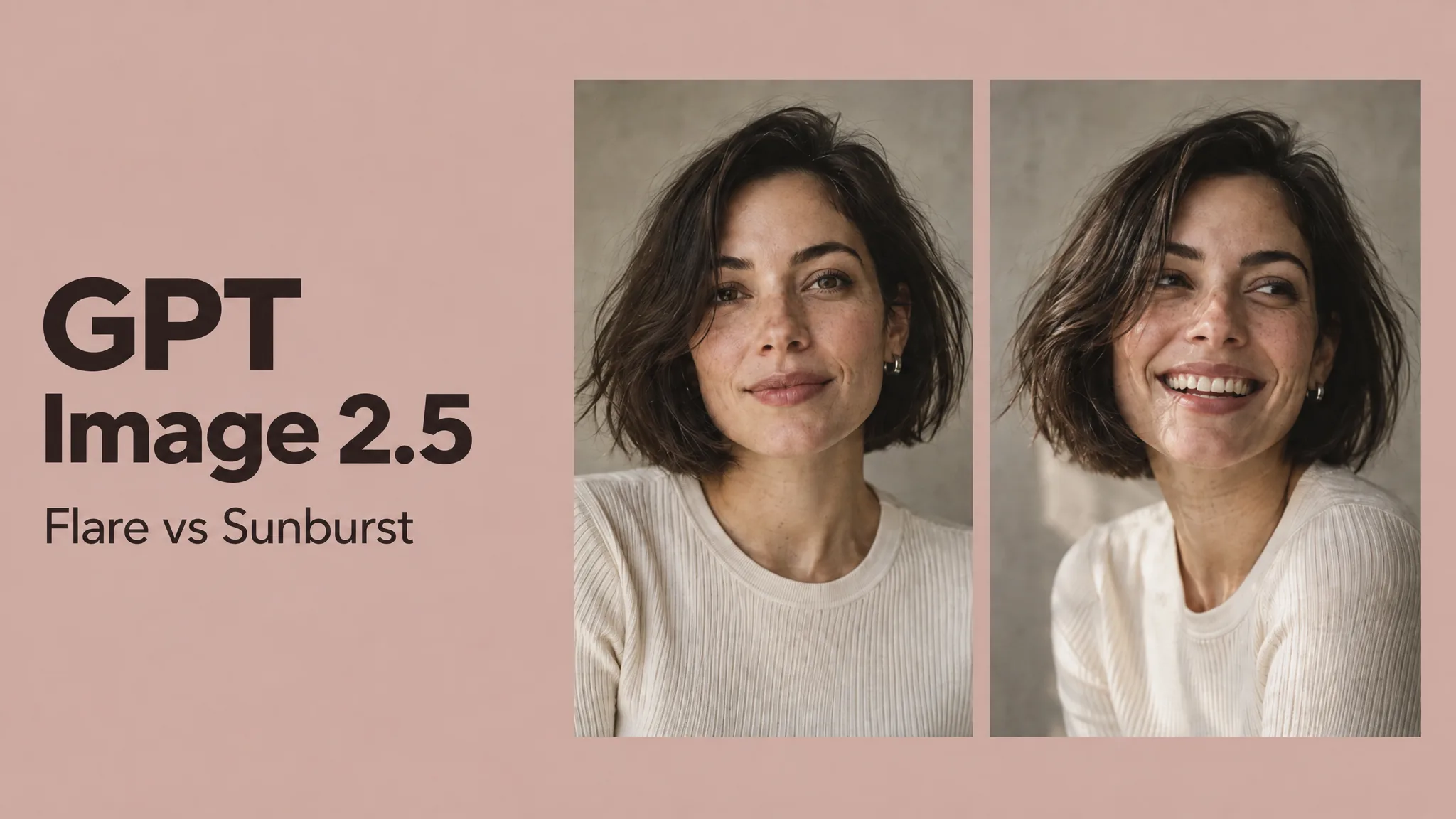
GPT Image 2.5 comes in two versions: Flare and Sunburst.
Flare is the faster version, designed for everyday generation and rapid iteration. Sunburst takes longer but is better suited to creative work where detail, consistency and editing precision matter more.
For most creative work, Flare is the natural starting point. Sunburst becomes more useful when you are refining an image, preserving a reference or working toward a polished final asset.
What is GPT Image 2.5 Flare?
Flare is the faster version of GPT Image 2.5.
It is designed for everyday image generation, creative exploration and workflows where you want to produce several ideas or variations quickly.
That makes it a good fit for social content, campaign concepts, visual prototyping, moodboards, thumbnails and early creative development.
For example, if you are exploring several directions for a campaign, speed matters. You may want to test different compositions, environments or visual styles before deciding which idea deserves more refinement.
In that situation, Flare makes more sense than spending extra generation time on every first draft.
What is GPT Image 2.5 Sunburst?
Sunburst is the more precision-focused version of GPT Image 2.5.
It is intended for work where maintaining details, preserving references and controlling edits matters more than generating as quickly as possible.
That makes it more relevant for polished campaign work, detailed image editing, reference-based generation and final creative assets.
This does not mean every Sunburst image will automatically look better than every Flare image.
The important difference is how much the task depends on small details being right.
If you are still exploring ideas, Flare may already give you everything you need. If you are refining a selected image and want tighter control, Sunburst becomes more useful.
Flare vs Sunburst: what is the main difference?
The easiest way to think about the two versions is:
Flare is for faster iteration. Sunburst is for greater precision.
Flare helps you move quickly through concepts and variations.
Sunburst is better suited to stages of the creative process where unwanted changes become more expensive or frustrating.
For many creators, the most practical workflow is not choosing one version permanently. It is starting with Flare while the concept is still flexible, then moving to Sunburst when the image needs more controlled refinement.
Flare vs Sunburst: same prompt comparison
The clearest way to compare the two versions is to give them exactly the same prompt with the same settings.
This does not prove that one version is universally better. It simply shows how each handles the same creative brief.
Test 1: cinematic editorial scene
Use the same aspect ratio, resolution and prompt for both generations.
Prompt
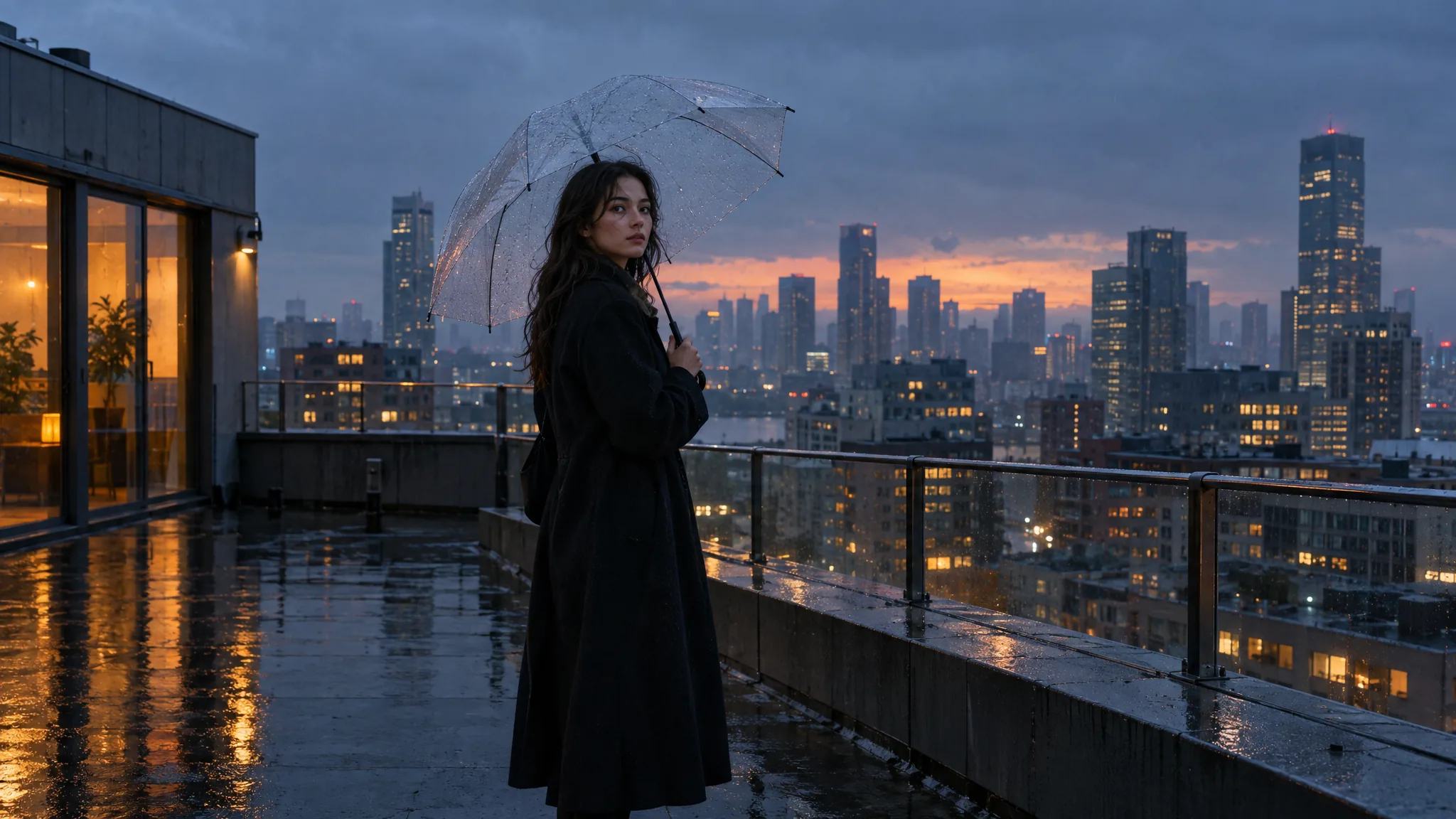
Create a cinematic editorial photograph of a woman standing alone on the roof of a modern apartment building just after sunset.
She is wearing a long black coat and holding a transparent umbrella. The city skyline is visible behind her through light rain and atmospheric haze.
Use a wide 16:9 composition, eye-level camera and natural 35mm lens feel.
Lighting should combine cool blue evening light with warm orange reflections from nearby windows.
Keep the scene realistic and understated, with natural skin texture, believable fabric movement and subtle rain reflections on the rooftop.
Avoid fashion-campaign posing, exaggerated neon lighting and artificial-looking skin.
GPT Image 2.5 Flare result
GPT Image 2.5 Sunburst result
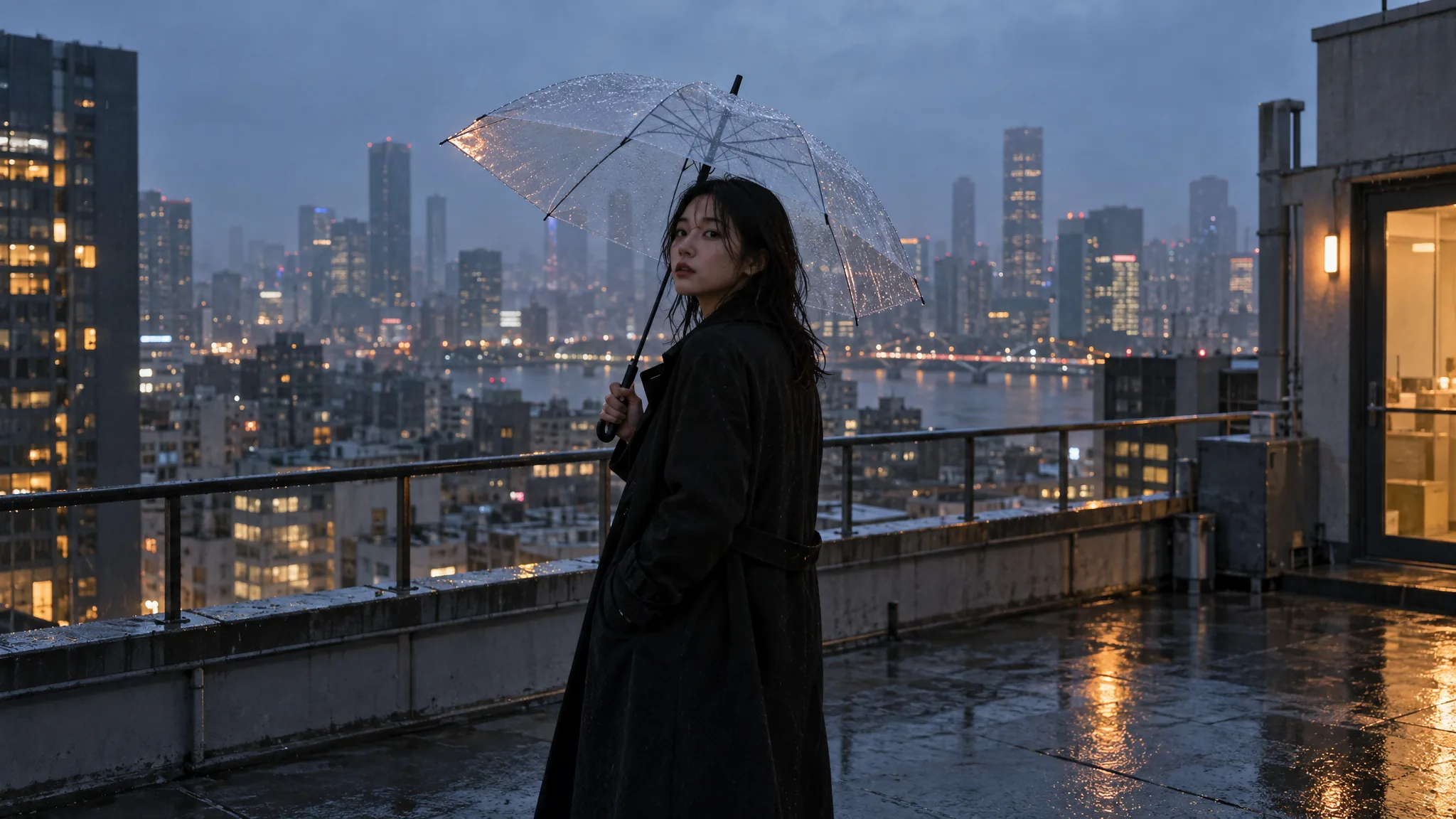
Once both images are generated, compare composition, anatomy, lighting, fabric detail, atmosphere and how naturally each version interprets the scene.
If the difference is small, that is useful information too. It may show that Flare is already sufficient for straightforward text-to-image generation.
Is Sunburst actually better quality than Flare?
Not automatically.
Sunburst is the more precision-focused version, but that does not mean it will visibly outperform Flare on every prompt.
For a simple generation, Flare may already produce a result that is just as useful.
The difference should matter more when the task involves reference preservation, controlled editing or details that need to remain consistent across revisions.
So choosing Sunburst simply because it sounds like the higher-end version is not always the most efficient approach.
Use it when the task actually benefits from the extra precision.
Which is faster: Flare or Sunburst?
Flare is faster.
That is one of its main advantages.
For a single image, the time difference may not matter much. But when you are producing many concepts or variations, generation speed quickly becomes part of the creative workflow.
This makes Flare more practical for rapid ideation, social content, testing different campaign directions and other high-volume work.
Sunburst makes more sense when waiting longer is acceptable because maintaining details is more important.
Which version is better for image editing?
This is one of the areas where Sunburst becomes particularly relevant.
GPT Image 2.5 already improves reference preservation and multi-step editing. Sunburst is the version better suited to work where those details need tighter control.
For a fair comparison, both versions should receive the same original image and the same editing instruction.
Test 2: editing the same reference image
First, create one original image.
Original image prompt
Create a realistic cinematic photograph of a young woman sitting at a small table inside a quiet late-night diner.
She has shoulder-length dark hair, a neutral expression and is wearing a simple dark-gray sweater.
A white ceramic coffee cup sits in front of her.
Use warm overhead diner lighting mixed with cool blue light coming through the window behind her.
Medium shot, eye-level camera, natural 50mm photography feel.
Keep the scene realistic, understated and slightly melancholic. No text, no logos and no dramatic posing.
Original image
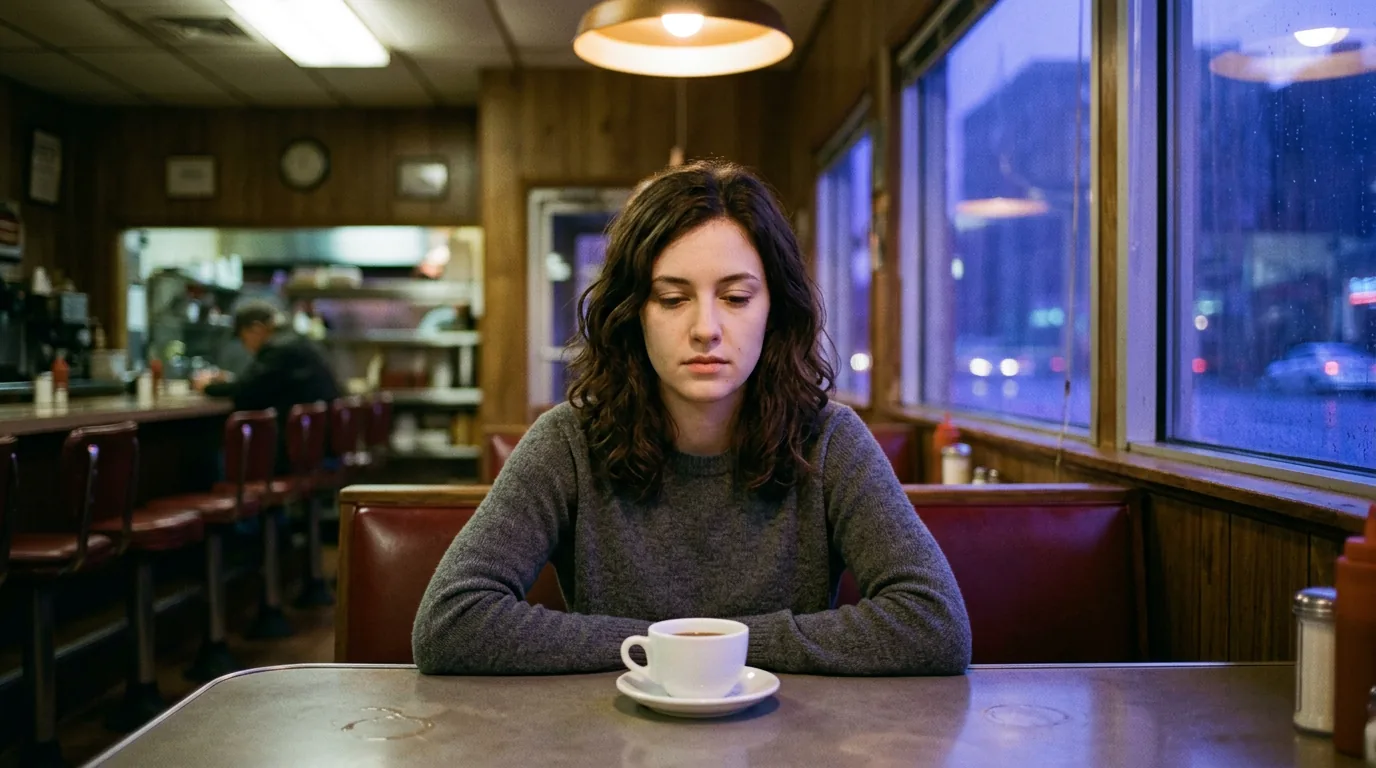
Use this exact same image for both edits.
Editing prompt
Change only the setting from a late-night diner to an empty train carriage at night.
Keep the same woman, face, hairstyle, expression, pose, body proportions, clothing, camera angle and crop.
Replace the table and diner environment with a realistic train interior and dark windows showing blurred city lights outside.
Match the new lighting naturally to the existing subject.
Do not change the woman's appearance or expression.
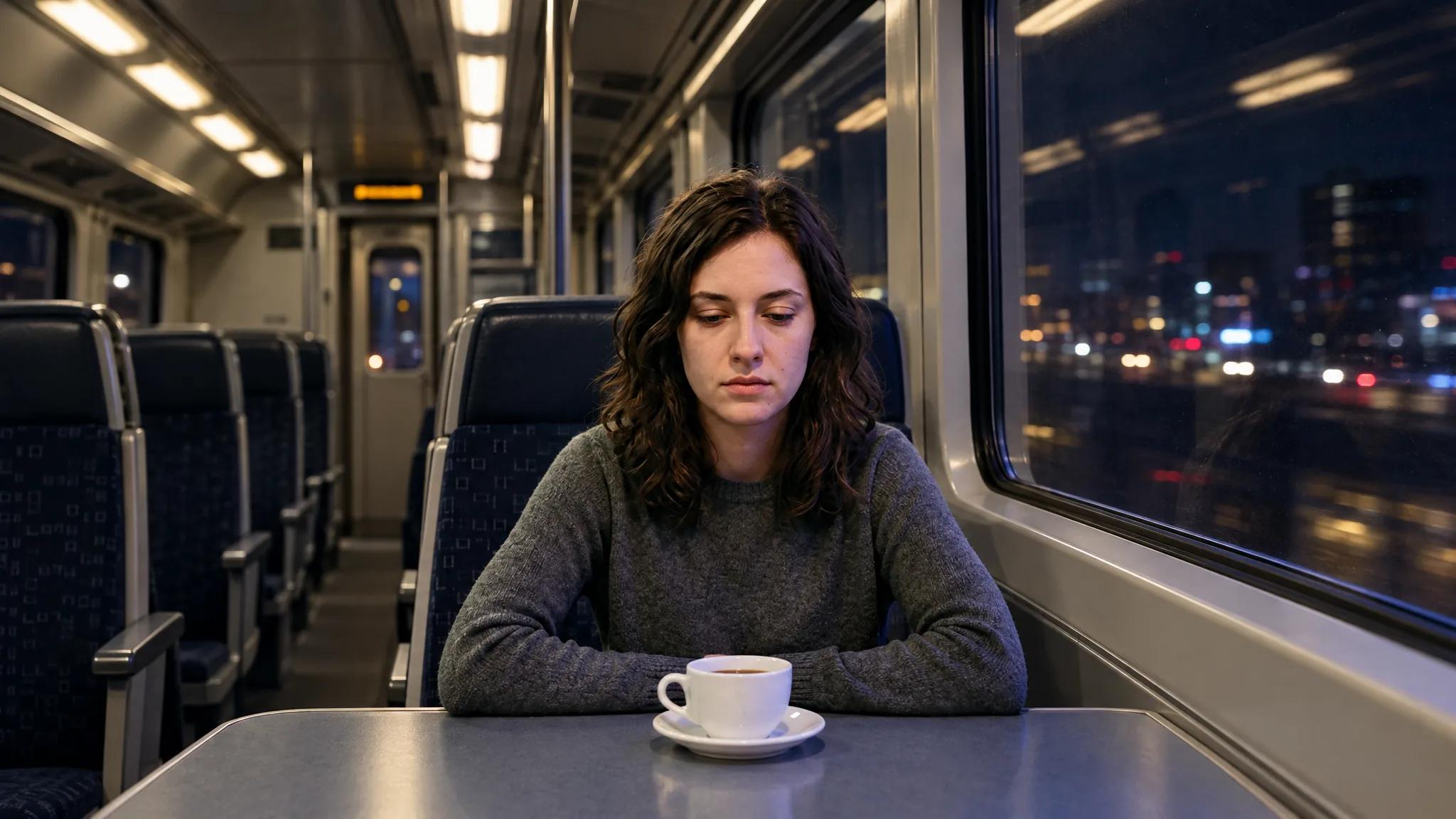
GPT Image 2.5 Flare edit
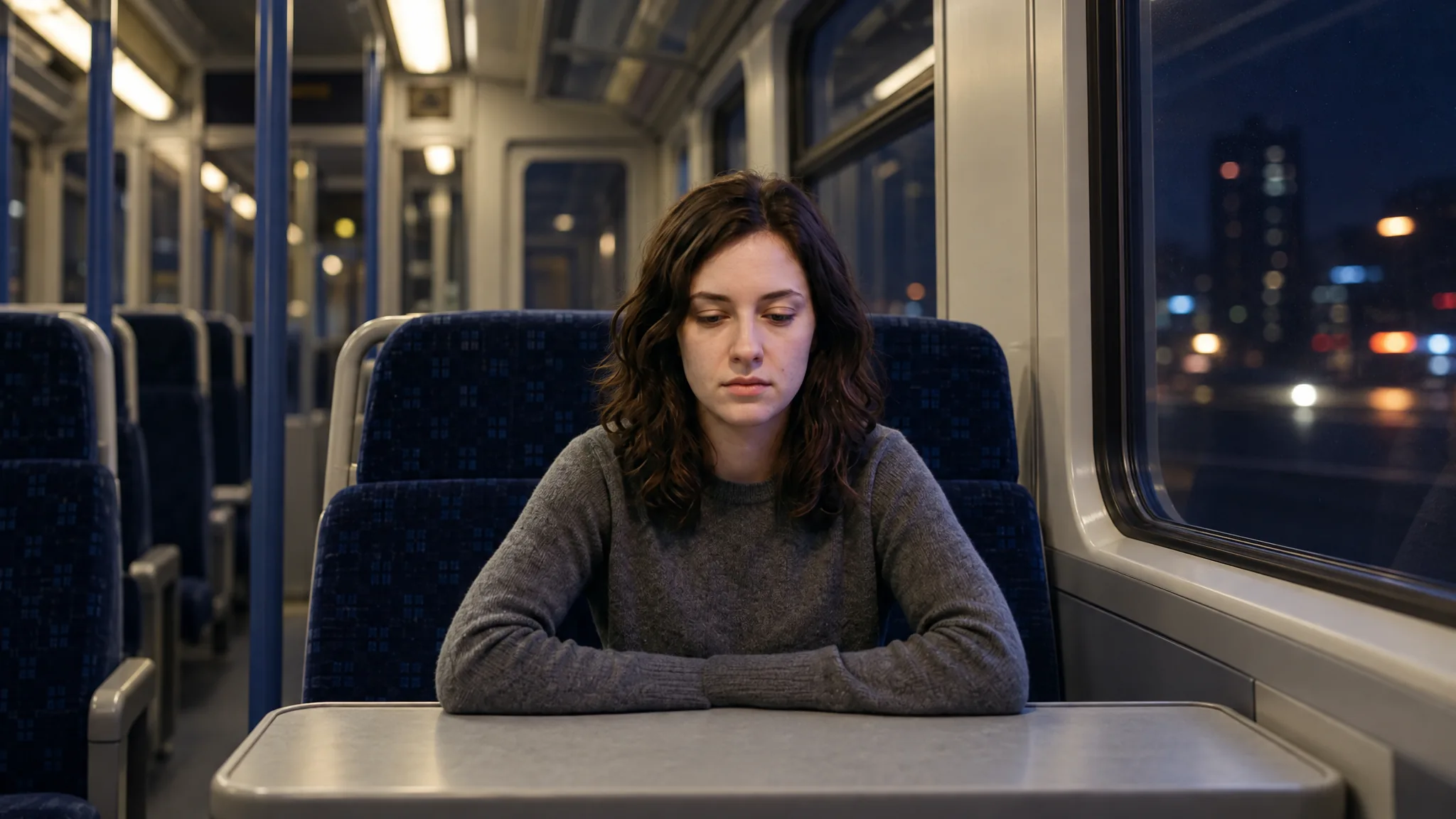
GPT Image 2.5 Sunburst edit
What happened in our editing test?
In our test, Flare preserved the white coffee cup from the original image, while Sunburst removed it even though both versions received the same source image and the same editing prompt.
Both versions kept the woman, her clothing, pose and overall framing relatively consistent. But the missing cup shows that Sunburst's precision-focused positioning does not mean it will preserve every requested detail better in every generation.
This is an important distinction for creators using reference-based edits. It is worth checking not only the main subject, but also smaller scene elements, props and objects that the prompt asks to keep unchanged.
In this test, Flare followed that part of the instruction more accurately. That does not make Flare universally better for editing, but it shows why the final result matters more than assuming one version will always outperform the other.
Which version is better for product images?
Product imagery is another useful test because small changes can matter.
Flare is a good fit for quickly exploring product concepts, different backgrounds, campaign directions and compositions.
Sunburst becomes more useful when product fidelity matters more, especially once you already have a strong concept and want to preserve specific details.
Test 3: product generation
Use the same prompt and settings with both versions.
Prompt
Create a premium advertising photograph for TOTTO wireless over-ear headphones.
The headphones have a sculptural matte black design with brushed aluminum details and a small understated TOTTO wordmark on the outer ear cup.
Place the headphones on a translucent smoked-glass pedestal inside a dark contemporary studio.
Use one soft spotlight from the upper left, subtle atmospheric haze and realistic reflections in the glass.
Three-quarter product angle, slightly below eye level.
Keep the headphones as the clear focal point with generous negative space around them.
The image should feel like a high-end technology campaign photographed for a design magazine rather than a generic ecommerce render.
Keep the TOTTO wordmark spelled exactly as written. Do not add other text, accessories or products.
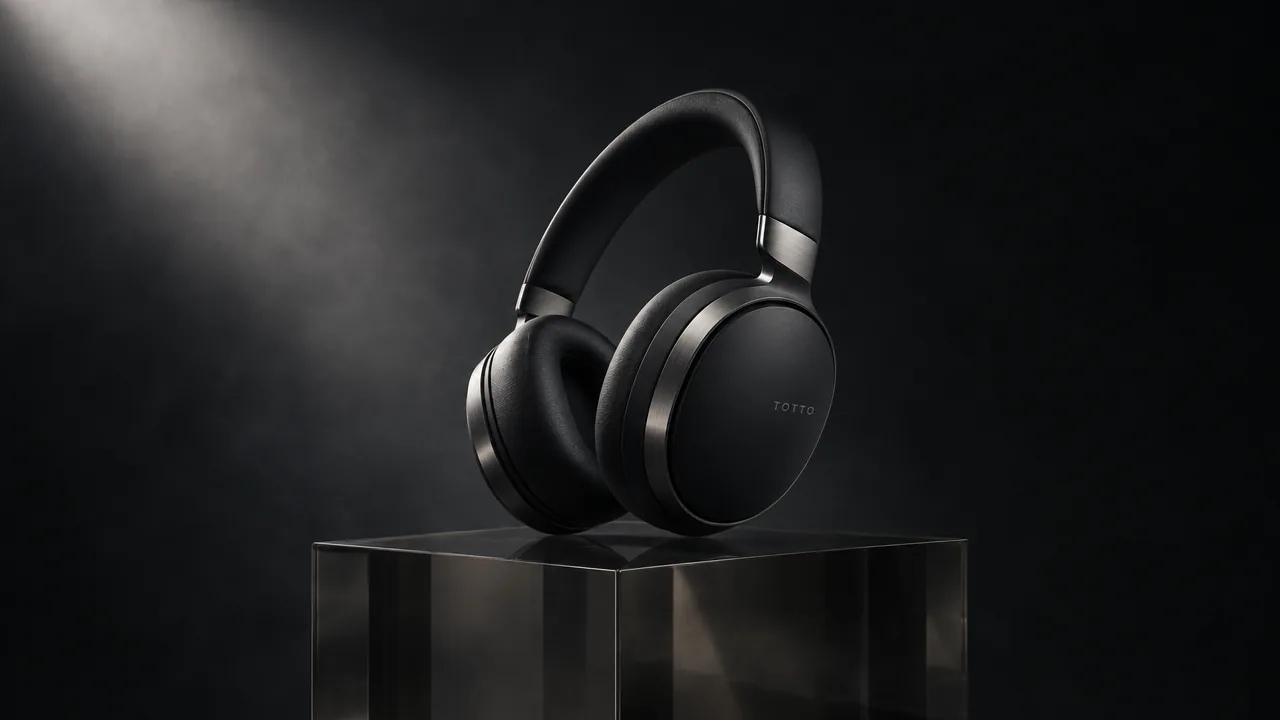
GPT Image 2.5 Flare result
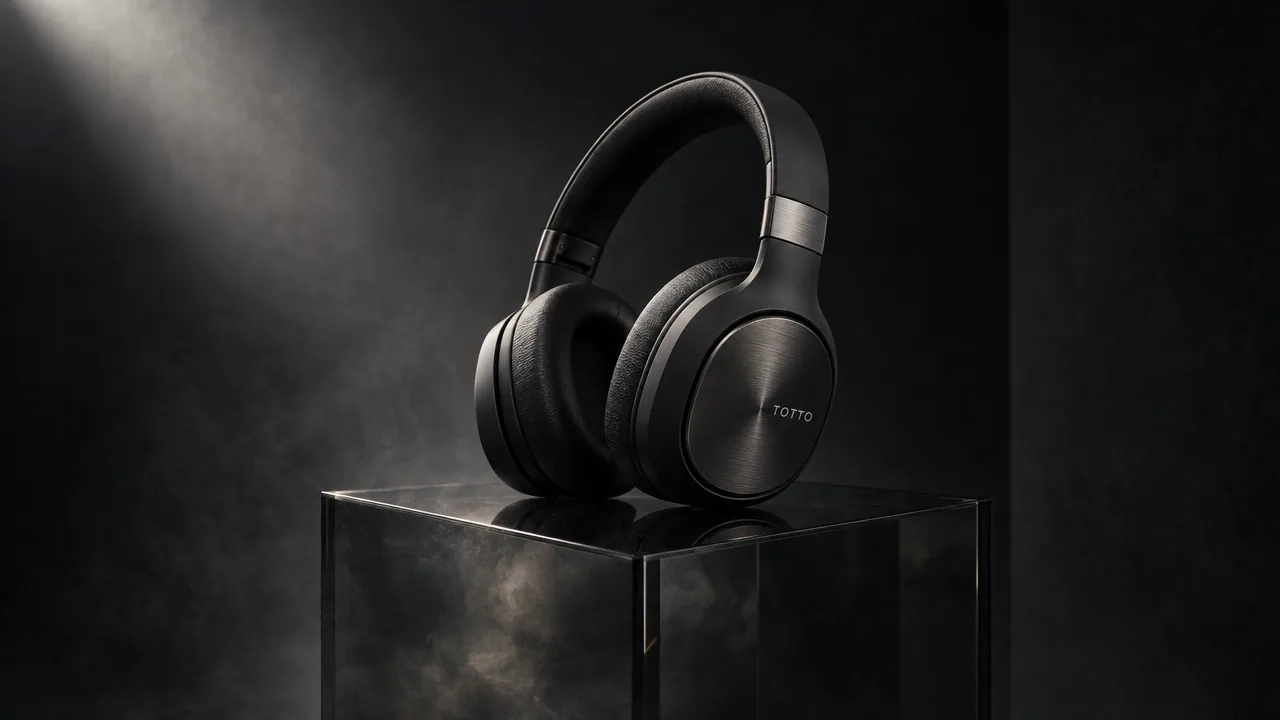
GPT Image 2.5 Sunburst result
What happened in our product test?
Both versions produced strong, usable product images and kept the overall headphone design and TOTTO branding consistent.
Flare stayed slightly closer to the requested restrained studio composition and translucent smoked-glass pedestal. Sunburst created a more dramatic interpretation, with stronger material texture and a darker, heavier pedestal.
The difference here is relatively small, and Sunburst is not automatically the more accurate result. In this test, Flare followed some parts of the original brief more literally, while Sunburst took more creative freedom with the scene.
For creators, this reinforces the same point we saw in the editing test: Sunburst can be useful when precision matters, but the final output still needs to be judged against the actual prompt rather than assuming it will always be the better or more faithful version.
Which version is better for advertising creative?
It depends on where you are in the creative process.
Flare is better suited to early campaign development, when you may be testing several concepts, layouts or visual directions.
Sunburst becomes more relevant after a direction has already been chosen and the creative needs tighter control.
For example, you might use Flare to explore three different visual worlds for a campaign. Once one direction is selected, Sunburst can make more sense for refining the final image and making controlled edits.
That makes the two versions complementary rather than direct competitors in every situation.
Should you use Flare for social media content?
For most social content, yes.
Social production often involves volume. You may need several thumbnails, ad variations, feed images or creative concepts before deciding what to publish or test.
Flare fits that kind of workflow well because it lets you iterate quickly.
Sunburst can still be useful for a final hero image or an important campaign asset, but using it for every social variation may be unnecessary.
Is Sunburst worth the longer generation time?
Only when the task benefits from additional precision.
If you are brainstorming or testing creative directions, there is little reason to spend longer on an image you may discard.
If the creative is already close to final and an unwanted change to a face, product or reference would require another generation, waiting longer can make more sense.
In practical terms, Sunburst becomes more valuable as the work moves closer to final production.
Can you use Flare and Sunburst together?
Yes, and that may be the most practical way to use GPT Image 2.5.
Start with Flare while you are exploring.
Test different compositions, backgrounds, visual directions and ideas quickly.
Then move to Sunburst when the selected concept needs more precise editing or detail preservation.
This mirrors a normal creative workflow: broad exploration first, controlled refinement second.
Flare or Sunburst: which version should you choose?
Choose GPT Image 2.5 Flare when speed, iteration and volume matter most. It is the better starting point for everyday generation, social content, concept development and producing multiple variations.
Choose GPT Image 2.5 Sunburst when the creative is moving toward final production and preserving details across edits matters more than speed.
For many creators, the best workflow is:
Flare first, Sunburst when necessary.
That gives you speed while ideas are still flexible and greater precision once the creative direction has been decided.
Common questions
What is the difference between GPT Image 2.5 Flare and Sunburst?
Flare prioritizes speed and rapid iteration, while Sunburst is better suited to work where editing precision and preserving details matter more.
Is GPT Image 2.5 Flare or Sunburst better?
Neither is better for every task. Flare is the better default for fast generation, while Sunburst is more useful when tighter creative control is needed.
Which version of GPT Image 2.5 is faster?
Flare is faster and is designed for everyday generation, experimentation and higher-volume creative work.
Is Sunburst better quality than Flare?
Not necessarily. Sunburst focuses on greater precision, but in our editing test Flare preserved a requested scene detail that Sunburst removed. Results can still vary by prompt and generation.
Which GPT Image 2.5 version is better for image editing?
Sunburst is better suited to detailed edits where important elements must remain consistent, while Flare is useful for faster exploratory changes.
Which version is better for product images?
Flare works well for quickly exploring product concepts. Sunburst is more useful when product details and consistency need tighter control.
Should I use Flare or Sunburst for social media images?
Flare is usually the better choice because social production often requires multiple concepts and variations quickly.
Can I use Flare and Sunburst in the same workflow?
Yes. A practical approach is to explore concepts with Flare and use Sunburst when the selected image needs more precise refinement.