MAI Image 2.7 and MAI Image 2.7 Flash on Aristotto: Photoreal Pictures and Precise Edits
 by Aristotto7 min
MAI Image 2.7 and MAI Image 2.7 Flash are live on Aristotto. Microsoft AI introduced both on November 17, 2026 at Microsoft Ignite, in public preview. MAI Image 2.7 is the precision model for generation and editing; Flash is built for speed and volume at less than half the cost. On Artificial Analysis’ image-editing leaderboard (AA-Image-Editing v2.1, November 16, 2026), MAI Image 2.7 ranked first with 1,215 Elo.
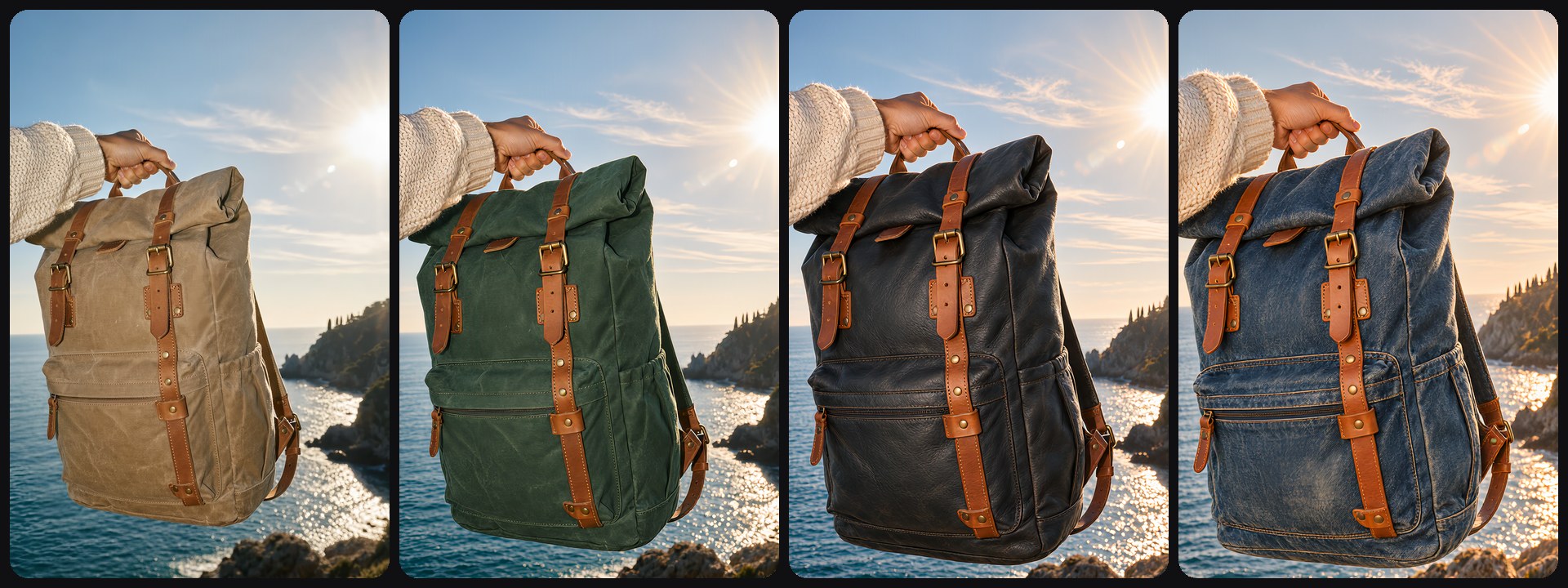
Every picture in our launch film is MAI Image 2.7. A rolltop backpack held up over the sea turns from sand canvas to forest green, black leather and washed denim, each version edited from the one before while the hand, the sky and the sea stay put. A street poster for a rooftop cinema launches in Japanese, French and Spanish with every letter in place. And the green backpack goes into a beach campaign, put together by MAI from four pictures, that ends up on a billboard over a city crossing. To show the pictures in motion, each one is the reference for a short Seedance 2.5 shot.
MAI Image 2.7 or MAI Image 2.7 Flash?
| Feature | MAI Image 2.7 | MAI Image 2.7 Flash |
|---|---|---|
| Best for | Finals: products, portraits, campaigns | Drafts, variations and volume |
| 1K picture | 60 credits | 20 credits |
| 2K picture | 230 credits | 70 credits |
| Edit with pictures | Up to 5 | Up to 5 |
| Shapes | 1:1, 3:2, 2:3, 4:3, 3:4, 16:9, 9:16 | 1:1, 3:2, 2:3, 4:3, 3:4, 16:9, 9:16 |
| Transparent background | Yes | Yes |
Edits add a small amount for each picture you bring. The workspace shows the exact credits before you generate.
Where it shines
Product shots: a clean packshot on a transparent background, ready for a store or an ad.
Portraits and fashion: skin, hair and fabric with real texture, and edits that keep the face.
Ads with words: posters, covers and menus where the lettering has to be right.
A character across scenes: the same person in new places, one edit at a time.
Everything it does on Aristotto
Text to image: seven shapes (1:1, 3:2, 2:3, 4:3, 3:4, 16:9 and 9:16), 1K or 2K, as PNG, JPEG or WebP.
Image to image: edit with up to 5 pictures, such as a person, a product and a place, in one sentence. Auto keeps the shape of your picture.
Transparent backgrounds: set Background to Transparent for products, logos, icons and stickers ready to place on any design.
How to make your first picture
Open the workspace, choose Image, and pick MAI Image 2.7 in the model list.
Choose Standard or Flash.
Pick Text to image, or Image to image and add up to five pictures.
Set the shape, 1K or 2K, the format, and the background.
Describe the photograph: subject, light, lens and mood. Put any words that should appear in quotes.
Press Generate.
How we made the launch film
The film tells three short stories, every picture made with MAI Image 2.7. First the backpack, from one sentence:
Photograph: a hand in a chunky cream knit sleeve holds a rolltop backpack up against a bright summer sky above the sea, the backpack in sand-coloured waxed canvas with tan leather straps and brass buckles, crisp and sharp against the soft blurred sea, warm sun from the side.
Then three edits in Image to image, each made from the one before, each saying what to keep:
“Change only the colour of the backpack’s canvas to a deep forest green. Change nothing else: the hand, the sleeve, the backpack’s shape, straps and buckles, the framing, the sky, the sea and the light stay exactly the same.”
“Change only the material of the backpack from canvas to soft black leather with a natural grain.” (with the same list of what to keep)
“Change only the material of the backpack to washed indigo denim with visible stitching.” (again with the same list)
Next, a street poster on a brick wall at dusk, lettered “ROOFTOP CINEMA”, “FRIDAYS · 9 PM” and “FILMS · FOOD · MUSIC”. To launch it in three more markets we edited the finished poster once per language and gave the new words in quotes. For France:
Launch the poster in France: replace its lettering with “CINÉMA SUR LE TOIT”, under it “LES VENDREDIS · 21 H”, and at the bottom “FILMS · CUISINE · MUSIQUE”, spelled exactly like that, in the same typeface style, sizes and positions. Keep the illustration, colours, paper, wall, framing and light exactly the same.
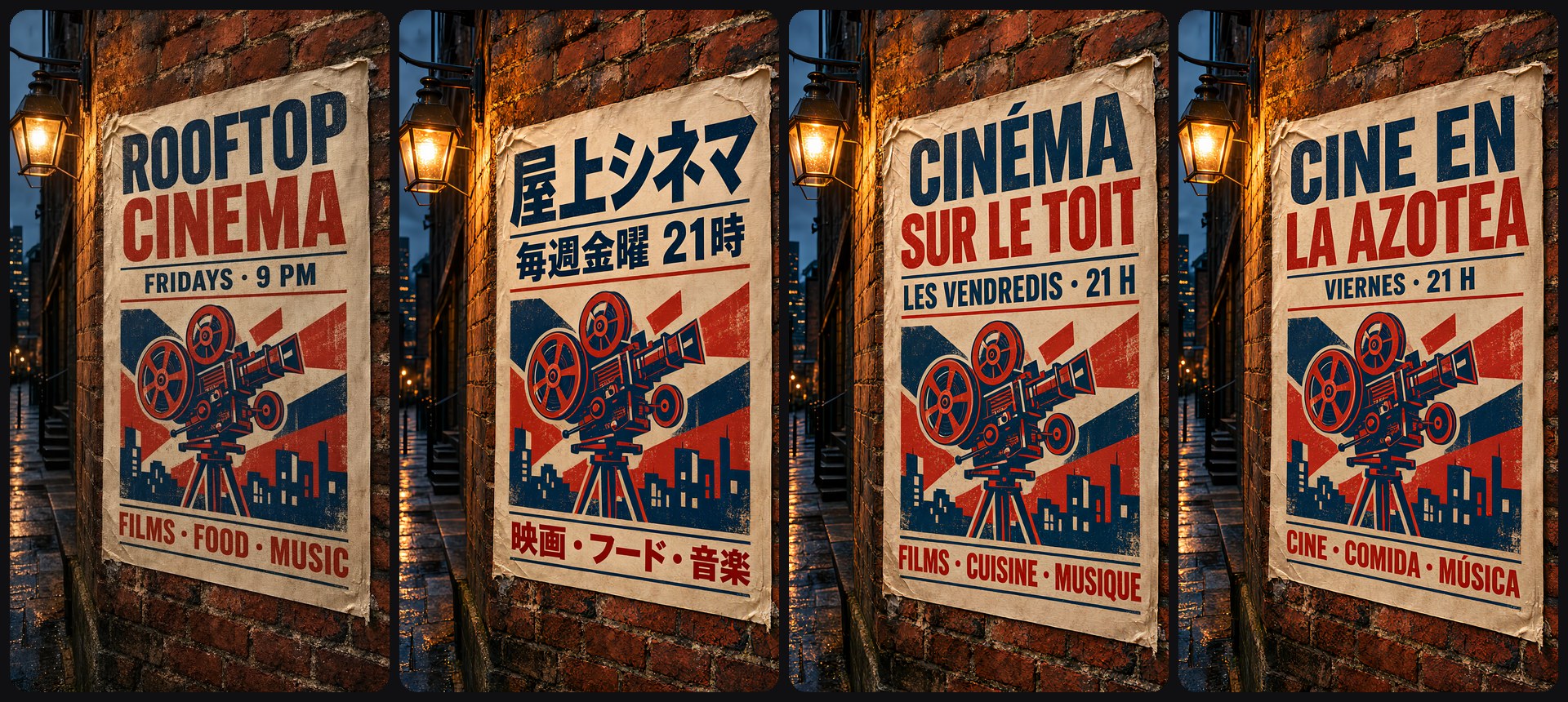
All four read right, the Japanese “屋上シネマ” included, while the projector, the paper and the wall stayed the same. One of our eight posters (two shapes per language) needed a second try for a misspelt word.
Last, the campaign. We made three realistic reference pictures with Seedream 5.5: a man in an oatmeal sweater, his scruffy dog, and an empty beach at sunrise. MAI Image 2.7 combined them with its green backpack in a single edit of four pictures: the man walks the beach with the dog on its leash and the backpack on his back, his face and the dog kept from the references. Then MAI put that campaign photo on the blank billboard of a street photo above a busy city crossing at dusk, and lettered it “CARRY THE WEEKEND”.
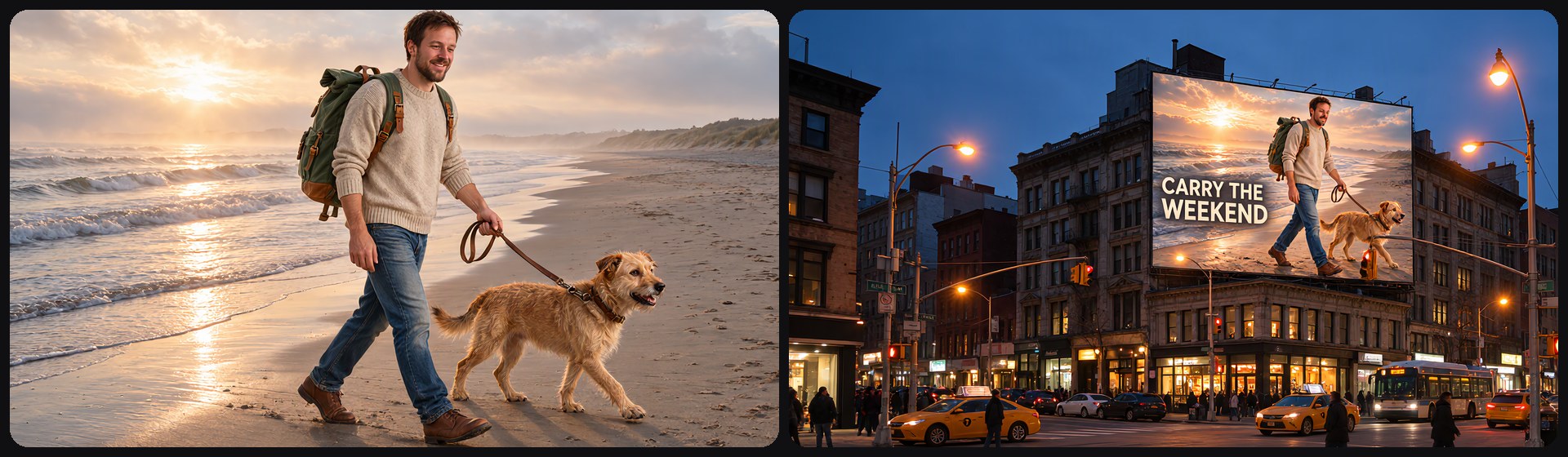
To put the pictures in motion, each one became a 4 to 8-second clip with Seedance 2.5 Reference to video, the MAI picture as its reference (for the campaign also the man, the dog and the backpack), told to keep the product, its colour and every printed letter exactly as they are.
Prompt tips
Write it like a photographer. Name the light (studio flash, golden hour), the lens (85mm, telephoto) and the mood.
Quote the words. Put every word that should appear in quotes and keep it short.
Say what to keep when you edit. Face, hair, pose, framing and light: list what must not change.
Edit in steps. Make each edit from the last result, one change at a time.
Translate by editing. For another market, edit the finished picture and give the new words in quotes. The picture stays; only the lettering changes.
Draft on Flash, finish on Standard. Explore ideas at 20 credits, then make the keeper on MAI Image 2.7 at 2K.
Good to know
Both models are in public preview from Microsoft.
The largest size is 2K.
MAI Image 2.7: questions
What is the difference between MAI Image 2.7 and Flash?
MAI Image 2.7 gives the finest detail and prompt following; Flash is faster and costs less than half as much. Both edit, both make transparent backgrounds, and both go up to 2K.
Can it put words in a picture?
Yes. Put the exact words in quotes and keep them short. A close shot where the text fills the frame reads best.
How many pictures can I edit with at once?
Up to five in Image to image, for example a person, an outfit and a place, combined in one sentence.
Will an edit keep the rest of the picture?
In our tests it did across three edits in a row: the backpack changed colour and material while the hand, the sky and the sea stayed the same. Say what to keep in the prompt (face, hair, pose, framing, light) and make each edit from the last result.
Can I make a picture with a transparent background?
Yes. Set Background to Transparent and choose PNG or WebP.