How to Use Tapcade: Make, Play and Share a Game
 by Aristotto4 min
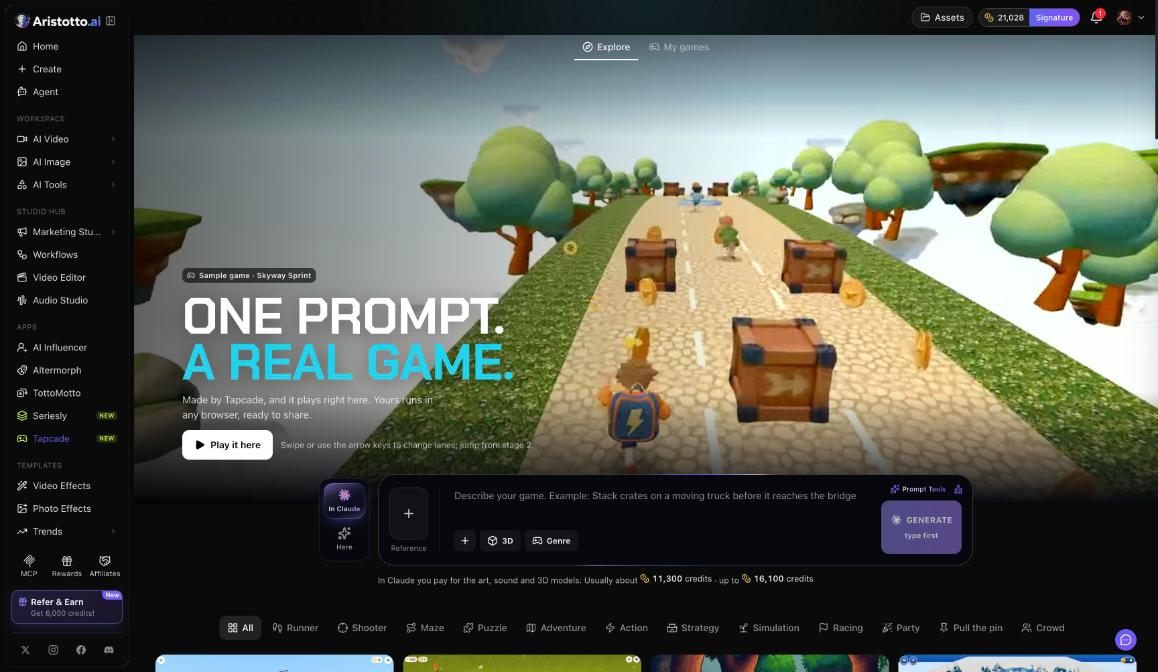
Tapcade makes a playable game from one sentence. Describe the game, pick 2D or 3D and a genre, choose In Claude or Here, and press Generate. The game plays right in the browser, and you can share it with a link that anyone can play.
Tapcade is under Apps in the left rail (/app/tapcade), marked New. This guide covers making a game, genres, cost, starter games, playing, editing, downloading and sharing, with a worked example.
How do you make a game?
In the left rail, open Apps, then Tapcade.
Describe your game in one sentence.
Add a Reference.
Pick 2D or 3D.
Pick a genre.
Choose In Claude or Here.
Press Generate.
Your game appears under My games when it is ready.
Which genres can you choose?
Tapcade has 12 genres:
Runner, Shooter, Maze, Puzzle
Adventure, Action, Strategy, Simulation
Racing, Party, Pull the pin, Crowd
Separately, you choose 2D or 3D. Pick the genre closest to how your game is played.
What does a game cost?
Here: the price in credits is on the Generate button before you press it.
In Claude: you pay for the art, sound and 3D models. The usual cost is about 11,300 credits, and the most it reaches is 16,100.
Failed, timed-out and partly failed runs are refunded automatically.
How do you try a starter game?
Tapcade has 19 starter games, for example Skyway Sprint, a 3D lane runner. Press Play it here to try one in the browser before you make your own. The Trends page under Templates also lists Tapcade genres and games.
How do you play, change and download your game?
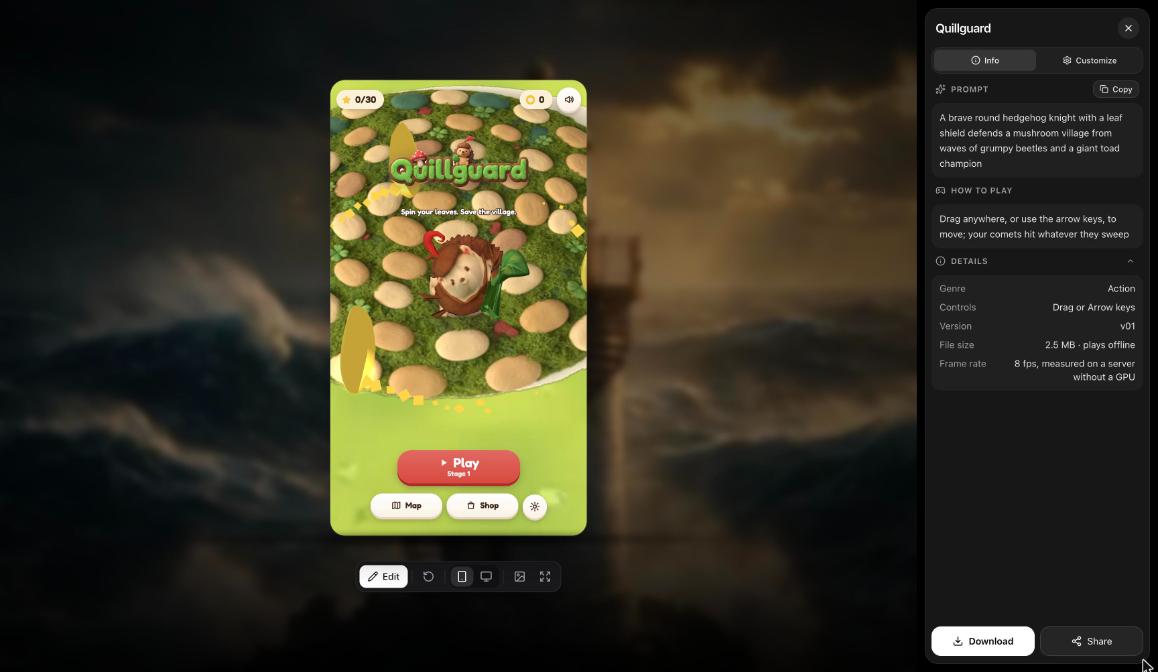
Open My games and press Play. A game opens with Info and Customize:
Info: the prompt, How to play, and details including genre, controls, version, file size, whether it plays offline, and frame rate.
Customize, to adjust the game.
From the same screen you can also:
Edit the game.
Download it as one file.
Share it.
How do you share your game?
Open the game and press Share. Anyone with the link can play.
Copy the link and send it.
Or embed the game on a website.
Shared games live at an aristotto.ai/play/ address.
Example: how do you make and share a truck-stacking game?
Open Tapcade from Apps.
Type: Stack crates on a moving truck before it reaches the bridge.
Pick 3D.
Pick a genre, for example Puzzle.
Choose Here.
Read the price on Generate, then press Generate.
Open the game from My games and press Play. Read How to play in Info.
Use Customize or Edit to change anything that does not feel right.
Press Share and copy the link. Anyone with the link can play.
What should you check when it does not work?
The game is not what you described: use Edit or Customize, or write a clearer one-sentence description and make it again.
Running In Claude: check your balance first. The usual cost is about 11,300 credits, and it can reach 16,100.
Friends cannot open your link: copy the link again from Share and check that it was pasted in full.
You want to play without a connection: check the details in Info, which say whether the game plays offline.
You cannot find your game: open My games.
A run failed: it is refunded automatically.
Questions
Can anyone play a game I share?
Yes. Anyone with the link from Share can play, right in the browser.
Can I put my game on my own website?
Yes. Share lets you embed the game on a website.
Can I download my game?
Yes. Download saves the game as one file.
What does making a game in Claude cost?
You pay for the art, sound and 3D models, usually about 11,300 credits and up to 16,100.
Where do I find the games I made?
Open My games in Tapcade and press Play on the one you want. From there you can also Edit, Download or Share it.