How to Use TottoMotto: Remake a Video With Your Cast
 by Aristotto4 min
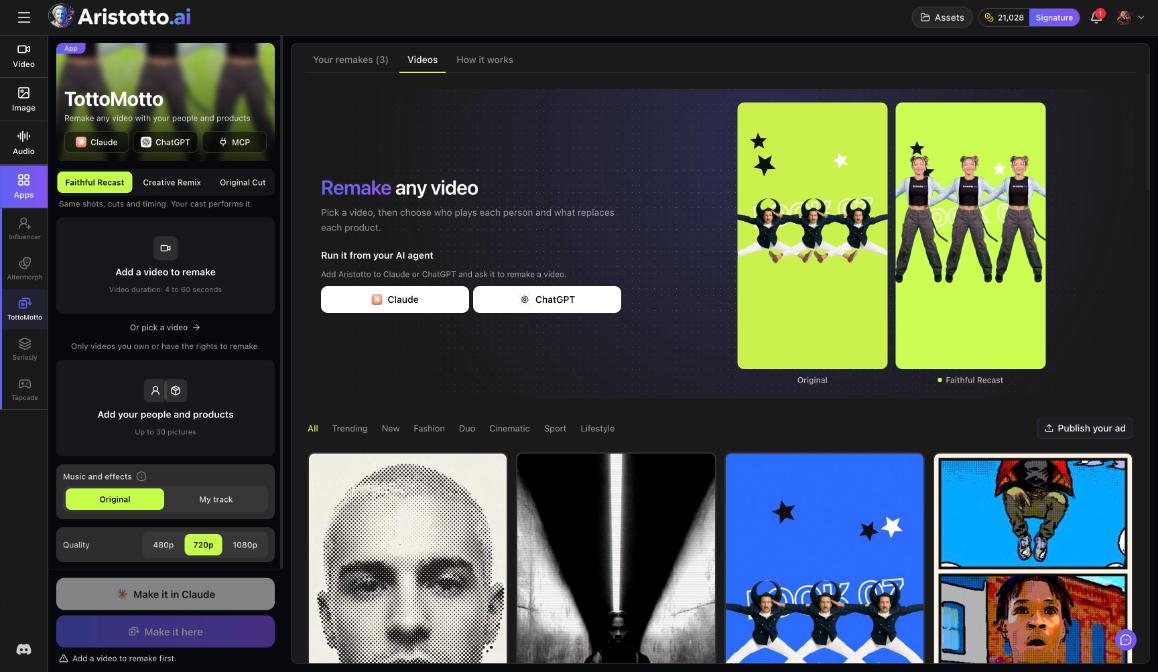
TottoMotto takes a video and remakes it with your people and products. Add a video of 4 to 60 seconds and up to 30 pictures of your cast, pick a mode and quality, and see the price before you start. It runs here, or from Claude, ChatGPT or MCP.
Open TottoMotto from Apps in the left rail (/app/tottomotto). This guide covers modes, source videos, your cast, the price, editing a finished remake, a worked example and what to check.
Which mode should you pick?
TottoMotto has three modes:
Faithful Recast: keeps the same shots, cuts and timing, and your cast performs it.
Creative Remix.
Original Cut.
Pick Faithful Recast when you want the original's shots, cuts and timing kept as they are and only the people and products changed.
Which video can you remake?
You have two ways to bring in a video:
Add your own video of 4 to 60 seconds.
Pick one from the Videos tab. Its categories are Trending, New, Fashion, Duo, Cinematic, Sport and Lifestyle.
The video must be one you own or have the rights to remake.
How do you add your cast and set up the remake?
Add your people and products: up to 30 pictures.
Choose Music and effects: Original keeps the source sound, or pick My track to use your own.
Choose Quality: 480p, 720p or 1080p.
Read the price. It is one take per filmed shot, shown before you start.
Press Make it here to run it on Aristotto, or Make it in Claude.
What can you change after the remake?
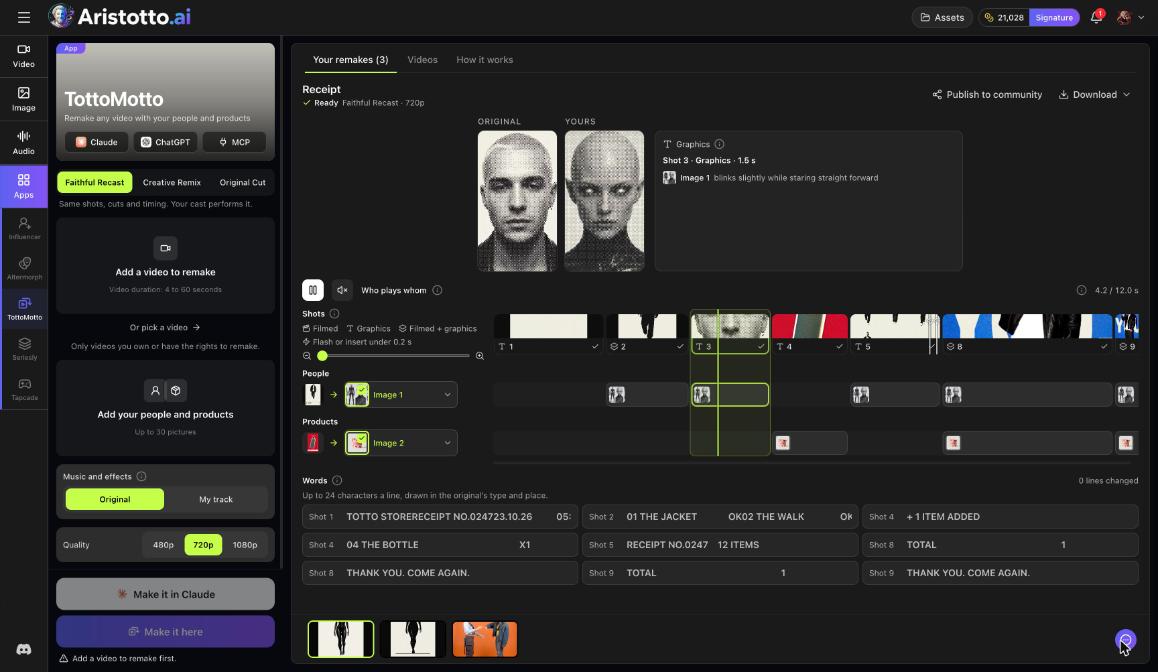
Your finished remake opens in Your remakes, with ORIGINAL and YOURS side by side. From there you can:
Who plays whom: change the person or product for each shot.
Shots timeline: each shot is labelled Filmed, Graphics or Filmed plus graphics.
Words: change on-screen text, up to 24 characters a line. The new words are drawn in the original's type and place.
Redo a shot that is not right.
Download in any size.
Publish to community.
When you publish from a team workspace, you also tick I have the team's permission. The team's owners and admins can take a published remake down.
Example: how do you remake your own product clip with a new presenter?
In the left rail, open Apps, then TottoMotto.
Choose Faithful Recast.
Add your own 20-second product video.
Add pictures of the new presenter and of the product.
Set Music and effects to Original.
Set Quality to 1080p.
Read the price, one take per filmed shot, and press Make it here.
In Your remakes, watch ORIGINAL and YOURS side by side.
If a shot shows the wrong person or product, change it in Who plays whom.
Use Words to update the on-screen price line, keeping each line to 24 characters.
Redo any shot that still looks off, then Download.
What should you check when a remake is not right?
Check the source video's length: it must be 4 to 60 seconds.
You are not sure you may use a video: only remake videos you own or have the rights to remake.
The wrong person or product is in a shot: change it in Who plays whom.
New on-screen text does not fit: keep each line to 24 characters.
One shot looks wrong: redo that shot instead of the whole remake.
The music is not what you wanted: choose Original or My track under Music and effects.
Publishing from a team workspace: tick I have the team's permission as well.
A run failed: failed, timed-out and partly failed runs are refunded automatically.
Questions
How long can my source video be?
From 4 to 60 seconds. Or pick one from the Videos tab.
Can I remake any video I find?
No. Only videos you own or have the rights to remake.
How many pictures can I add?
Up to 30 pictures of your people and products.
Can I change the text in the video?
Yes. Words changes on-screen text, up to 24 characters a line, drawn in the original's type and place.
Can I make a remake from Claude?
Yes. Press Make it in Claude, or run TottoMotto from ChatGPT or MCP.