AI Influencer: How to Build a Reusable Character
 by Aristotto3 min
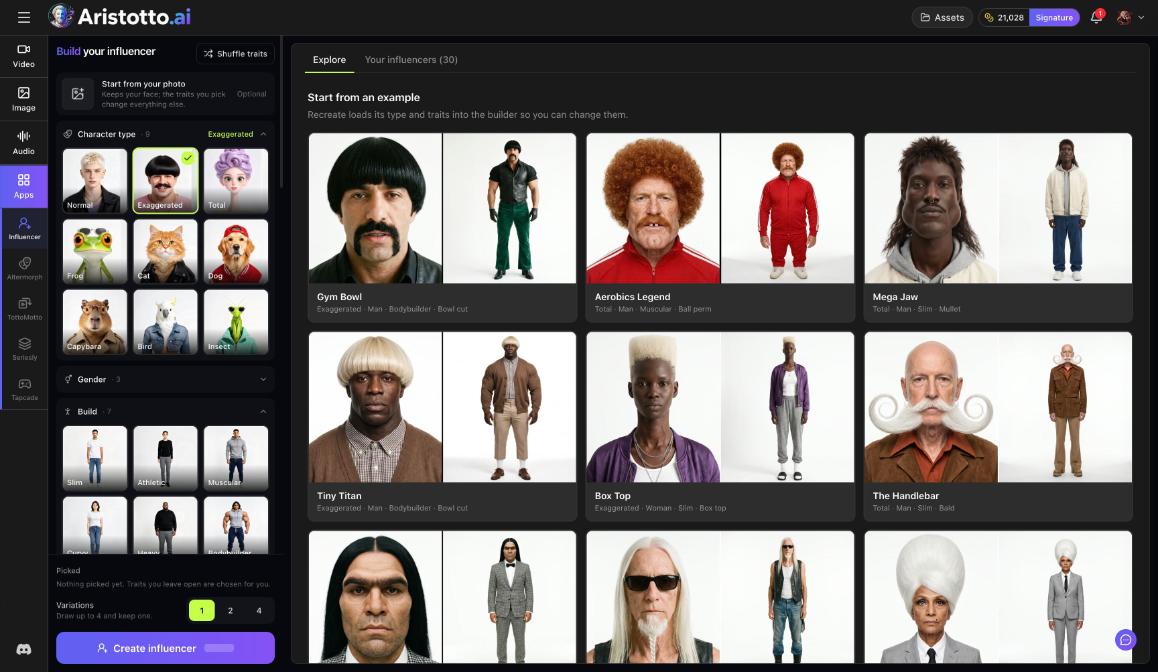
AI Influencer builds a character you can use again and again. You pick traits, draw a few variations and keep the one you like. The result is a two-panel character sheet that Altermorph casts in trending clips. Open AI Influencer under Apps in the left rail, or go to /app/ai-influencer. The price is the image price times the number of variations, shown on the button.
How to build your influencer
Open AI Influencer under Apps.
Optional: choose Start from your photo. It keeps your face, and the traits you pick change everything else.
Pick a Character type.
Choose Gender, Build, hair and outfit.
Leave any trait open and it is chosen for you, or press Shuffle traits.
Choose how many variations to draw: 1, 2 or 4.
Check the price on the button, then press Create influencer.
Keep the one you like.
Traits you can set
| Trait | Options |
|---|---|
| Character type | Normal, Exaggerated, Total, Frog, Cat, Dog, Capybara, Bird, Insect |
| Build | Slim, Athletic, Muscular, Curvy, Heavy, Bodybuilder |
| Gender, hair, outfit | Pick your own, or leave them open |
Any trait you leave open is chosen for you. Shuffle traits shuffles them for you.
How to start from an example
The Explore tab has examples you can start from.
Open Explore.
Pick an example under Start from an example.
Press Recreate. Its type and traits load into the builder.
Change any trait you want, then press Create influencer.
The Trends hub (Templates, Trends) also lists 30 AI influencers in its AI Influencer section.
What it costs
You pay the image price once for each variation:
| Variations | Price |
|---|---|
| 1 | the image price |
| 2 | twice the image price |
| 4 | four times the image price |
The exact price shows on the button before you press it. Failed, timed-out and partly failed runs are refunded automatically.
How to use your influencer in Altermorph
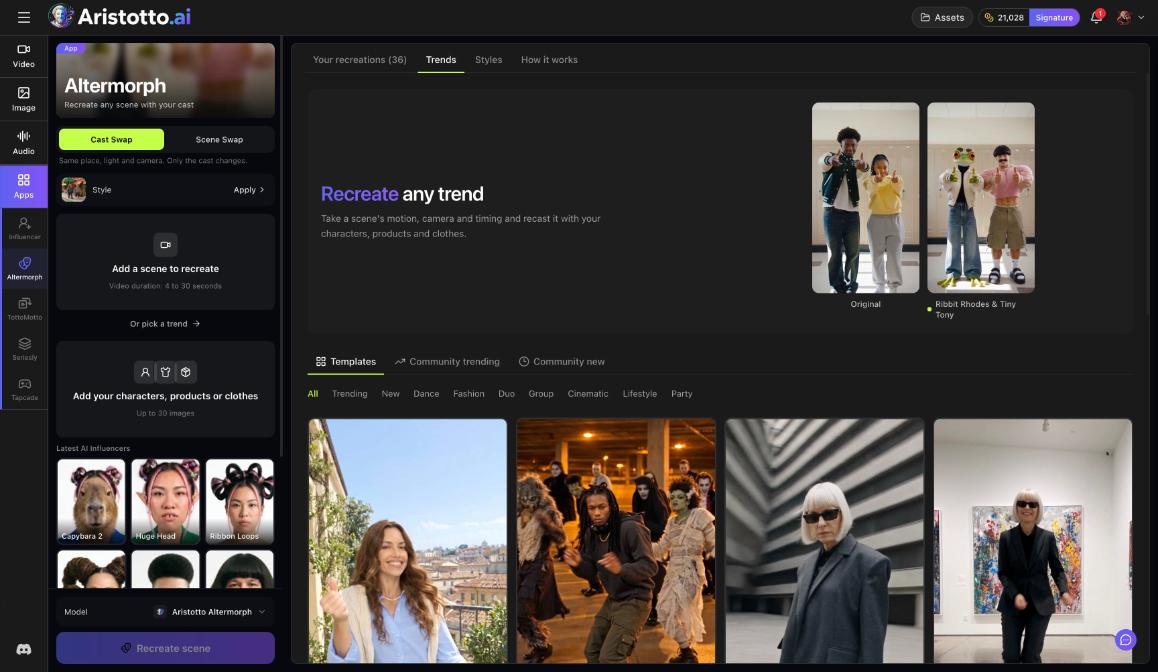
The influencers you keep are in the Your influencers tab. Altermorph (Apps, /app/altermorph) puts them into scenes.
Open Altermorph and choose Cast Swap (same place, light and camera; only the cast changes) or Scene Swap.
Add a scene to recreate: a video 4 to 30 seconds long, or pick a trend.
Add your characters, products or clothes, up to 30 images. Latest AI Influencers appear to pick from.
Pick the Aristotto Altermorph model and press Recreate scene.
The result shows ORIGINAL and RECREATION side by side, with Publish to Trends and Download video.
Questions
Can I make an influencer that looks like me?
Yes. Choose Start from your photo. It keeps your face, and the traits you pick change everything else.
Do I have to choose every trait?
No. Traits you leave open are chosen for you, or you can press Shuffle traits.
How much does an influencer cost?
The image price times the number of variations you draw. The total shows on the button.
Where do I find the influencers I made?
In the Your influencers tab of AI Influencer. Latest AI Influencers also appear in Altermorph when you add your cast.
How do I put my influencer in a video?
Open Altermorph, add a scene or pick a trend, choose your influencer from the latest AI Influencers, and press Recreate scene.