Billing: Invoices, Payment Methods, Cancelling and App Store Plans
 by Aristotto4 min
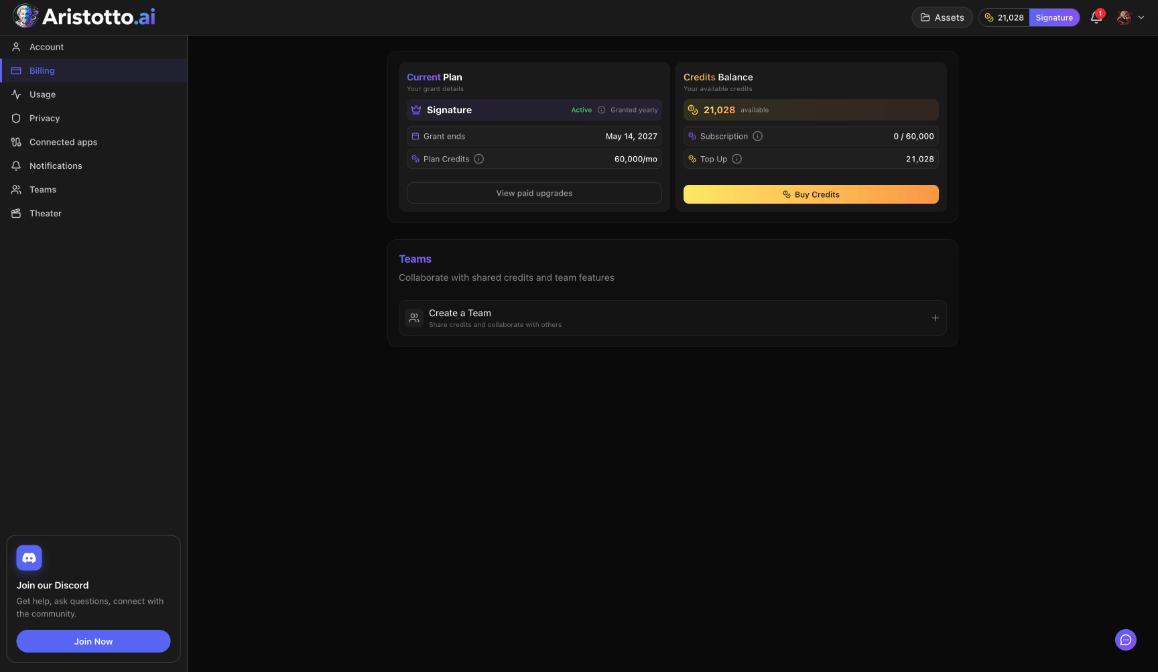
Billing for a paid plan lives in Settings, Billing. Manage Billing opens the Stripe portal, where you view invoices, update your payment method, manage your plan or cancel. Plans bought in the App Store or Google Play are managed in that store.
Open it from Manage Account in the account menu, then Billing. This article walks through each billing task, team billing, and what to check when a charge or change looks wrong.
What is on the Billing page?
| Section | What it shows |
|---|---|
| Current Plan | Plan, status, grant or renewal date, plan credits a month |
| Credits Balance | Available credits, subscription credits used of the total, top up |
| Buy Credits | One-time credit packs |
| Change Plan (paid plans) | Move to another plan |
| Manage Billing (paid plans) | The Stripe portal |
| Teams | Create a Team |
How do you see your invoices?
Open Settings, Billing.
Press Manage Billing.
Choose View Invoices in the Stripe portal.
Manage Billing appears on paid plans. New plans go through Stripe Checkout, and credit packs are a one-time payment through Stripe.
How do you update your payment method?
Open Settings, Billing.
Press Manage Billing.
Choose Update Payment and follow the steps in the Stripe portal.
How do you cancel your subscription?
Open Settings, Billing.
Press Manage Billing.
Choose Cancel Subscription in the Stripe portal.
Before you cancel:
Purchased credits never expire, including after you cancel.
Plan credits reset every billing month and do not roll over.
If you want a cheaper plan rather than none, use Change Plan to downgrade. A downgrade is scheduled for the end of your billing period.
Delete Account in Settings, Account is blocked while you have an active paid plan.
What if you pay through the App Store or Google Play?
Manage, change or cancel that plan in the App Store or Google Play. Store plans are managed there, not in Settings, Billing.
How does billing work for a team?
The person who pays when the team is created becomes the Owner. Billing, seats and the plan are owner tasks.
The plan card on the team page shows Billed monthly or yearly, Seats used (Manage), Renews, Price, Manage billing and Change plan.
Adding seats charges a prorated amount today; removed seats come off at renewal.
If a team payment fails, nobody on the team can generate, but the team's credits are kept.
Enterprise is billed through a custom agreement.
Example: How do you replace an expiring card?
Open the account menu and choose Manage Account.
Choose Billing in the Settings menu.
Press Manage Billing to open the Stripe portal.
Choose Update Payment and add the new card.
While you are there, choose View Invoices to check your latest payment.
Back in Settings, Billing, check Current Plan for the status and the renewal date.
What should you check when a billing change does not work?
No Manage Billing button. It appears on paid plans only. On Base, use Buy Credits for one-time packs.
A store plan. App Store and Google Play plans change only in the store.
A team plan. Billing, seats and plan changes belong to the Owner. Ask them, or check your role on the team page.
A downgrade that does not show. It takes effect at the end of the billing period.
A code that did not apply. There is one discount per checkout, so a code replaces a running promo.
A charge you do not recognize, or anything else. Open the chat bubble at the bottom right on desktop, choose Send feedback and pick Credits and Billing, or email support@aristotto.ai.
Questions
Where do I find my invoices?
In Settings, Billing: press Manage Billing, then View Invoices in the Stripe portal.
Do I lose my credits if I cancel?
Purchased credits never expire, including after you cancel. Plan credits reset every billing month and do not roll over.
Can I cancel an App Store plan on aristotto.ai?
No. Plans bought in the App Store or Google Play are managed in that store.
Why can I not delete my account?
Delete Account is blocked by an active paid plan, a team you own that still has members, or runs, exports and credit holds in progress.
Who pays for a team?
The team's Owner. The person who pays when the team is created becomes its Owner, and ownership can be transferred later. Owners handle billing, seats and the plan.