How to Use Audio Studio and the Audio Library
 by Aristotto4 min
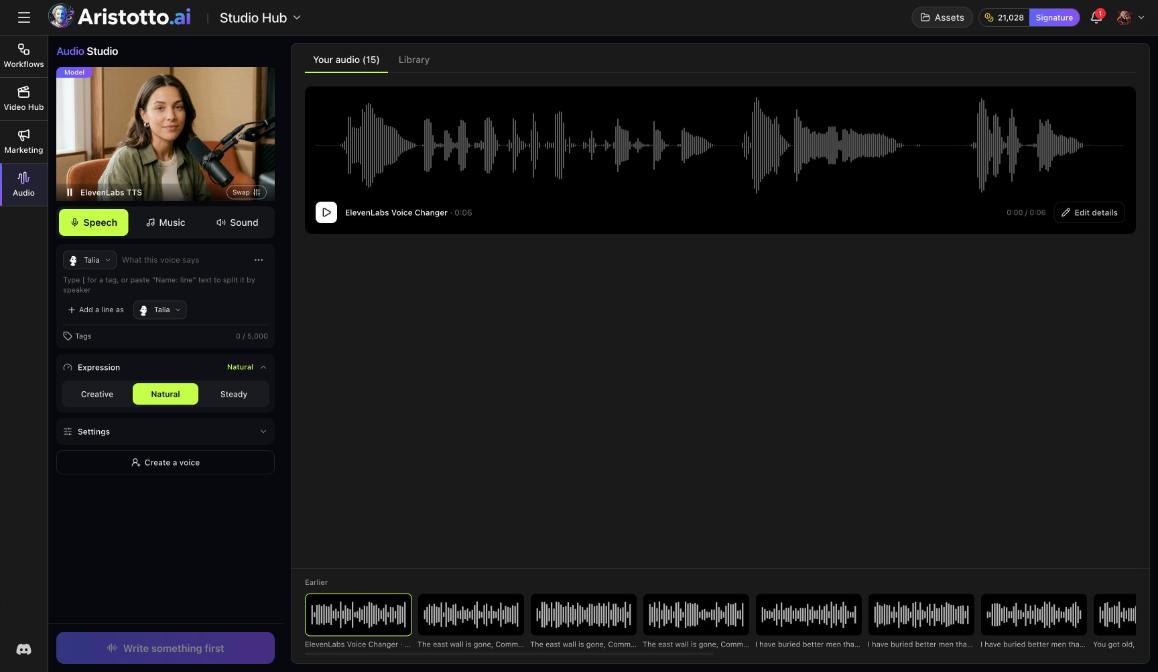
Audio Studio makes speech, music and sound effects, and the price shows on the button before you start. The Audio Library holds royalty-free music and sound effects that anyone can play; using and downloading them come with paid plans.
Audio Studio is under Studio Hub in the left rail (/app/workspace/hub/audio-studio). The Audio Library is under Templates (/audio-library). This guide covers both, with a worked example and fixes for common problems.
What does each Audio Studio tab make?
| Tab | What it makes |
|---|---|
| Speech | Voiceovers and dialogue from text you type |
| Music | Songs, covers, extensions and stems |
| Sound | Sound effects |
The right side of Audio Studio has two lists: Your audio, with what you made, and Library. The price shows on the button for every run.
How do you make a voiceover or a dialogue?
Open Audio Studio and pick Speech.
Pick a voice, for example Talia.
Type what the voice says.
For a dialogue, add a line as another voice. One dialogue holds as many as 10 voices.
Choose an Expression: Creative, Natural or Steady.
Open Settings if you want to adjust more.
Read the price on the button, then start.
If none of the voices fit, create a voice by describing it.
How do you make a song or work on existing audio?
Pick Music. It has four modes:
Song: describe the song, including any lyrics.
Cover.
Extend.
Stems: split audio into stems.
For a song, you also choose:
Instrumental only, when you want no vocals.
Length, or Let the model pick the length.
Settings, for the remaining options.
You can also make music in the workspace: pick the Audio tab, then Music, which uses ElevenLabs Music at 1, 2 or 3 min.
How do you find a track in the Audio Library?
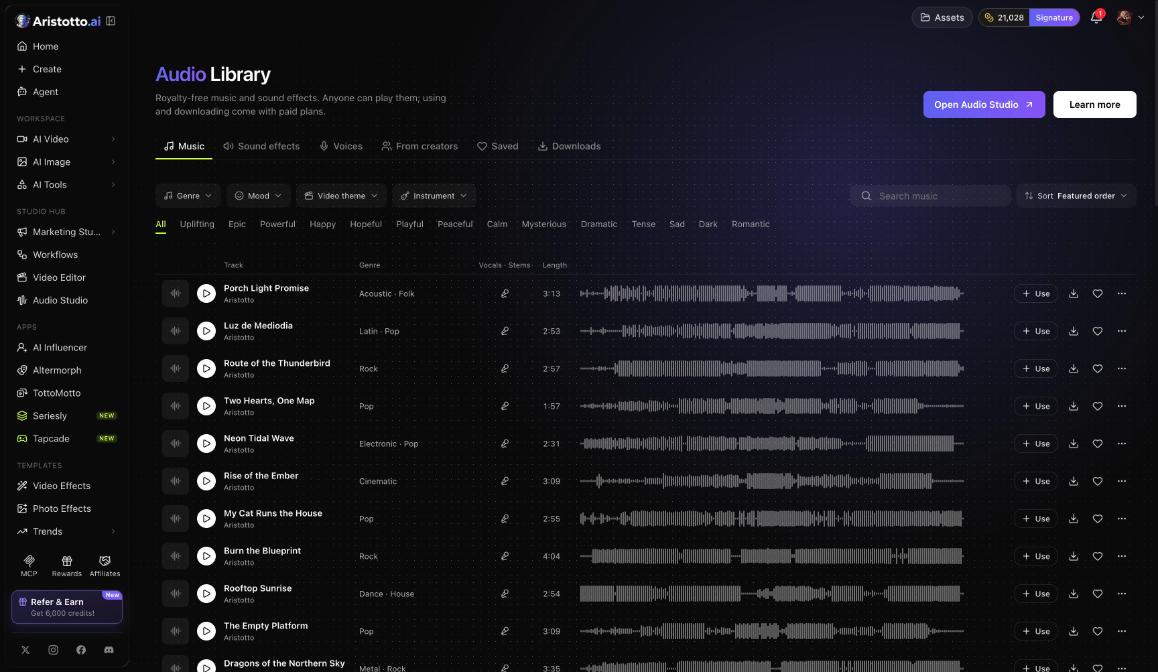
Open Audio Library under Templates in the left rail.
Pick a tab: Music, Sound effects, Voices, From creators, Saved or Downloads.
Narrow the list with the Genre, Mood, Video theme and Instrument filters, or tap a mood chip such as Uplifting, Epic, Powerful or Happy.
Search by word, or change the sort.
On each row, press play to listen, Use to open it in Audio Studio, download, or save it for later.
What can your plan do with library tracks?
| Plan | Play | Use | Download and commercial use |
|---|---|---|---|
| Base | Yes | No | No |
| Atelier | Yes | Yes | No |
| Virtuoso | Yes | Yes | Yes |
| Signature | Yes | Yes | Yes |
Downloads are limited to 40 a day and cost no credits.
Example: how do you make a two-voice ad read with background music?
Open Audio Studio and pick Speech.
Pick Talia and type the first line.
Add a line as another voice, pick a second voice and type the reply.
Set Expression to Natural.
Read the price on the button, then start. The result appears in Your audio.
Open the Audio Library, stay on the Music tab and tap the Uplifting mood chip.
Play a few rows and save the one that fits.
Press Use to open the track in Audio Studio (Atelier and up), or download it for your edit (Virtuoso and up).
What should you check when something does not work?
Use is not available: using library tracks needs Atelier or a higher plan.
Download is not available: downloading needs Virtuoso or a higher plan.
Downloads stopped for the day: the limit is 40 a day.
A song has no singing: turn off Instrumental only and put the lyrics in your description.
A song is the wrong length: set Length yourself instead of Let the model pick the length.
You cannot add another voice: one dialogue holds up to 10 voices.
You cannot find a file you made: look under Your audio on the right side of Audio Studio.
A run failed: failed, timed-out and partly failed runs are refunded automatically.
Questions
Can I use Audio Library music in commercial videos?
Yes, on Virtuoso and higher plans. Those plans can download tracks and use them commercially.
Do library downloads cost credits?
No. Downloads cost no credits, up to 40 a day.
How many voices can one dialogue have?
Up to 10. Add each new speaker with a line as another voice.
Can I split a song into parts?
Yes. Stems in the Music tab splits audio into stems.
Can I listen to library tracks on the free plan?
Yes. Anyone can play them. Using and downloading come with paid plans.