How to Use Tuko, the Aristotto Agent
 by Aristotto4 min
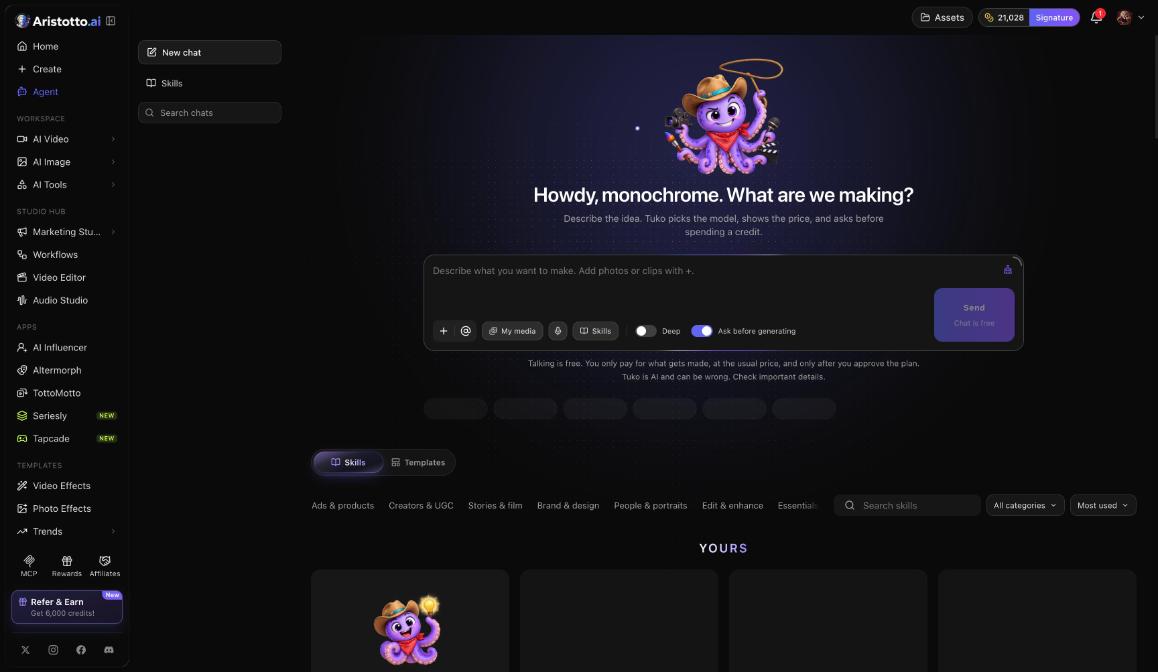
Tuko is the Aristotto Agent. You describe an idea in a chat, and Tuko picks the model, shows the price and asks before it spends a credit. Chat is free; you pay the usual price only for what gets made, after you approve the plan.
Open Tuko with Agent in the left rail (/app/tuko). This guide covers the screen, what Tuko costs, adding your own media, Skills, a worked example and what to check when a result is not right.
What is on the Tuko screen?
The left side has New chat, Skills and Search chats. The composer at the bottom holds these controls:
| Control | What it does |
|---|---|
| + | Adds photos or clips to the chat |
| @ | Mentions one of your media items in your message |
| My media | Shows the media you already have |
| Voice input | Lets you speak your message |
| Skills | Picks a skill for the chat |
| Deep | A switch in the composer |
| Ask before generating | Makes Tuko ask before it spends; on by default |
| Send | Sends your message |
What does Tuko cost?
Talking is free, so you can describe and refine the idea without spending credits.
Chat messages are limited per plan.
When something gets made, you pay the usual price for it.
You pay only after you approve the plan Tuko shows you.
If a run fails, times out or partly fails, it is refunded automatically, the same as anywhere else in Aristotto.
How do you give Tuko your own photos and clips?
Press + in the composer and add the photos or clips you want to use.
Open My media if the file is already in your account.
In your message, type @ and pick the item you mean. This tells Tuko exactly which file to use.
How do you use Skills?
A skill gives Tuko a ready-made way of working. You can use the ones Aristotto made, use your team's, or teach Tuko your own.
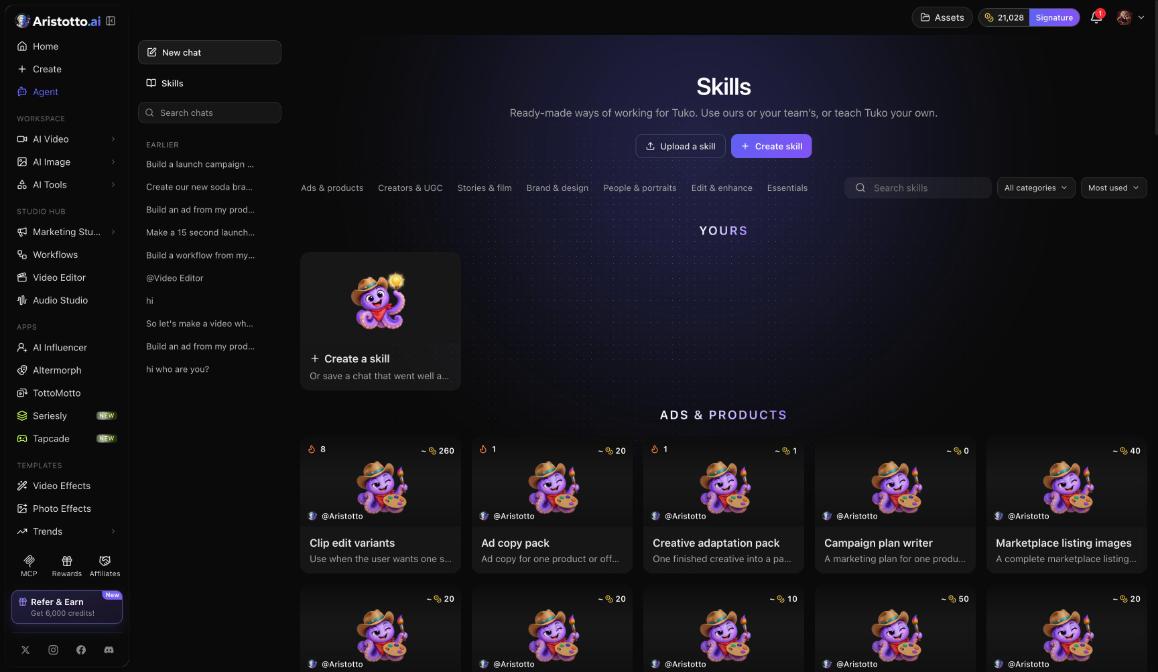
Browse by category: Ads and products, Creators and UGC, Stories and film, Brand and design, People and portraits, Edit and enhance, Essentials.
Example skills: Clip edit variants, Ad copy pack, Creative adaptation pack, Campaign plan writer.
Each card shows a usual cost, so you know roughly what a run with that skill spends.
To add your own, use Upload a skill or Create a skill, or save a chat that went well.
Open Skills on the left to browse them all, or press Skills in the composer to pick one for the chat you are in.
Example: how do you get Tuko to plan and make a product ad?
Press Agent in the left rail, then New chat.
Press + and add a photo of your product.
Type your idea, for example: three square ad images of my water bottle on a kitchen counter in morning light. Type @ and pick the photo so Tuko uses that exact file.
Check that Ask before generating is on.
Press Send.
Read Tuko's reply: the model it picked and the price.
Ask for changes in the chat if the plan is not right. This is still free.
Approve the plan. Credits are spent only at this point.
If the chat went well, save it as a skill so you can reuse the same approach next time.
What should you check when Tuko gets it wrong?
Tuko is AI and can be wrong. Read the model and price in the plan before you approve it.
Tuko used the wrong picture: mention the file with @ instead of describing it.
Something was made without asking: check that Ask before generating is on.
You cannot find an earlier conversation: use Search chats on the left.
The result failed: failed, timed-out and partly failed runs are refunded automatically. The History tab in the bell shows your runs as they finish or fail.
The price differs from a skill card: the card shows a usual cost, and the plan Tuko shows has the price for this run.
Questions
Is chatting with Tuko free?
Yes. Talking is free, and you pay only for what gets made after you approve the plan. Chat messages are limited per plan.
Will Tuko spend my credits without asking?
Not while Ask before generating is on, which is the default. Tuko shows the price and asks before it spends a credit.
Can I use my team's skills?
Yes. Skills can be ours, your team's or your own, and you can create, upload or save new ones from a chat.
How do I find an old conversation?
Use Search chats on the left side of the Tuko screen. New chat starts a fresh one.